PERRLA/Blog/APA/APA 101: Formatting a Webpage Reference
APA 101: Formatting a Webpage Reference
Citing a webpage in APA 7 takes five elements: author, date, title, site name, and URL. This post walks you through each one with examples and additional guidance for special cases, like when there's no author listed.
B
Brian @ PERRLA · Published April 23, 2026
Citing a website in APA 7 is mostly straightforward once you know what you’re looking for, but there’s one important rule before you start: the APA webpage reference type is only for content that was originally published as a webpage.
So, if you found a journal article on a website, you’d still format the reference using the journal article reference type. If you read a book online? You guessed it. You’d use the book reference type. Essentially, if the content fits another reference type, use that type instead. The webpage reference type is exclusively for content that lives natively on the web.
Let’s take a look at how to build a webpage reference in APA 7.
What information do you need?
Before formatting anything, track down these five pieces of information:
Start with the author’s last name, then initials. Put a period after each initial and a space between them.
Lloyd, J. C.
A few edge cases worth knowing:
If the author uses a screen name, use it as is, but only include the @ symbol if it actually appears that way on the page.
If both a real name and a screen name are listed, include the username in brackets: Doe, J. [@cryptidtracker].
End the author element with a period and a space.
2. Publication Date
Add the publication date (or last updated date) in parentheses:
(2021, April 30)
Use the full date when you have it. Year only is fine if that’s all that’s available. No date at all? Write (n.d.). End with a period and a space.
3. Title of the Webpage
Here’s where webpages differ from journal articles:
Italicize the title.
Use sentence case (only the first word and proper nouns get capitalized)
The Chupacabra, as far as anyone knows
4. Name of the Website
Next comes the site name. It’s the actual name of the organization or website, not the URL text. If you can’t find it immediately, check the top of the page or the copyright footer.
Not italicized (opposite of the title)
Title case (capitalize all major words)
Frontier Field Notes.
5. URL
Finally, add the URL. Keep it as a live hyperlink when possible – underlined and blue or not is your call. Just don’t add a period at the end, even if it feels weird to leave it hanging.
One more thing: If the page content is likely to change over time (think wikis or frequently updated resources), add a retrieval date before the URL.
Retrieved July 17, 2021, from https://…
If the content is stable, skip the retrieval date and just use the URL. (If you’ve got questions about when to include a retrieval date in an APA 7 reference, you may want to check out our recent blog post on the topic).
What if there’s no author?
Two scenarios here:
The organization is the author. This is common. The site author and the site name are the same entity, such as the Centers for Disease Control and Prevention, and in that case, list the organization at the beginning of the reference and skip the website name in the middle of the reference.
No author at all. Move the title to the front of the reference, before the date:
The Chupacabra, as far as anyone knows. (2021, April 30) …
Everything else in the reference remains the same. It’s just a reordering.
Finished reference
Here’s the final product with our example:
Lloyd, J.C. (2021, April 30). The Chupacabra, as far as anyone knows. Frontier Field
And that’s it. Five elements, one clean reference.
Creating a webpage reference using PERRLA
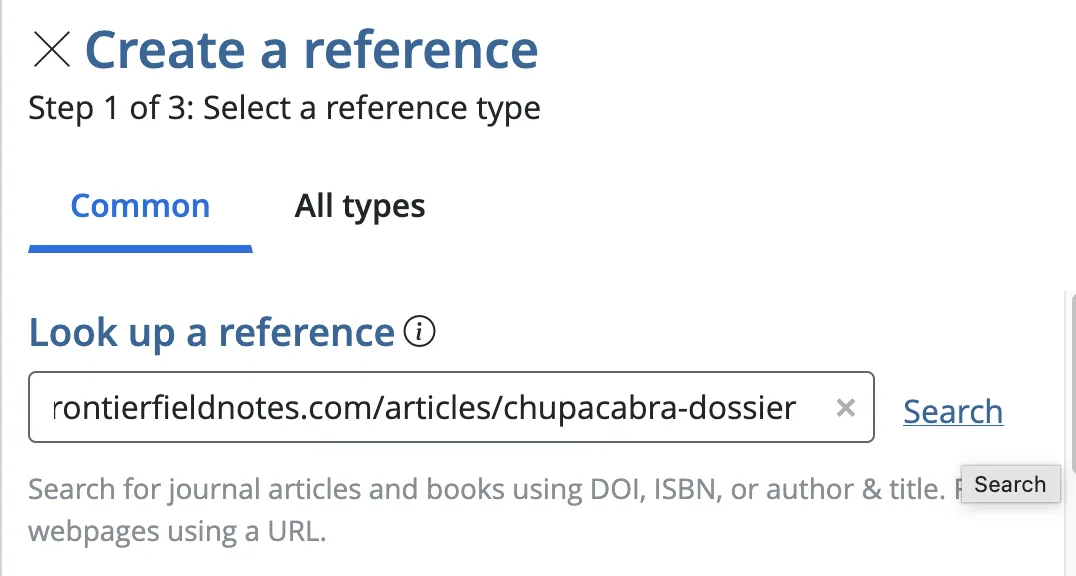
If you’re using PERRLA, then you really only need one piece of information to create a perfectly formatted webpage reference: the URL. It really is that simple.
Inside PERRLA, you’ll open the References & Citations panel, select Create A New Reference, then paste the URL into the designated field. PERRLA will then visit the URL, retrieve all available information, and format the reference for you.
Once PERRLA retrieves the information, it’ll give you the ability to review it first – allowing you to make any necessary tweaks to the information the person who built the webpage may have overlooked.
After that, all you have to do is select “Create,” and let PERRLA handle the rest. The reference will automatically be placed in the appropriate spot on your reference list and have a permanent home in your PERRLA Reference Library for use in any future research papers or discussion posts.
Sounds easy enough, right? Well, you don’t have to take our word for it. PERRLA offers a no-obligation, 7-day free trial that will allow you to test out every feature we offer (no credit card required). You can sign up for PERRLA’s 7-day free trial here.
An annotated bibliography follows standard APA reference formatting, then adds a short paragraph below each entry summarizing and evaluating the source. This guide covers what annotations include, how to format the…
Citing a TikTok or Instagram Reel in APA 7 means treating the caption as the title – the first 20 words, preserving the original spelling and capitalization, hashtags and all. This post covers the full format, how to…
Knowing how to format the five APA heading levels is only half the job. This post covers the practical side: when headings are actually required, why your introduction never gets one, how many levels your paper needs…
PERRLA formats the whole paper in APA 7, MLA 9, and Turabian 9, from the title page to the last reference.