


Emojis. Love ‘em or hate ‘em, it’s hard to deny they’re a part of modern language. Heck, they’ve even got their own animated movie.
And believe it or not, thanks largely to social media, there may even come a time when you need to include an emoji in a reference. In all their wisdom, the authors of the APA 7 publication manual foresaw this very scenario, no kidding (as evidenced by the absence of a winking emoji), and offered not one but two ways to handle emojis in your APA 7 references.
If at all possible, the APA says, an emoji should be replicated in a reference; however, if this is not possible, then the name of the emoji should be included inside [square brackets] as part of the reference. Let's take a look at a few examples:
Example One
Let’s say we want to cite a Blueksy post from a fictional user who goes by the username RealAPAfan_67. Ideally, we’d want our reference to look like this:
RealAPAfan_67. (2026, January 8). Thanks to PERRLA, I'm able to focus on the actual content of my paper 😀 [Post]. Bluesky. https://www.bluesky.com/exampleemojireference
But, if you cannot re-create the emoji, the APA says this example is also acceptable:
RealAPAfan_67. (2026, January 8). Thanks to PERRLA, I'm able to focus on the actual content of my paper [grinning face emoji] [Post]. Bluesky. https://www.bluesky.com/exampleemojireference
Example Two
What if we want to cite an X post from a mysterious figure known only for his or her love of breakfast cereal? Then, we'd format our reference as:
cerealsuperfan1291. (2021, February 12). I think I'll have another bowl of cereal. How could I not? 😅 [Post]. X. https://x.com/notarealpost
Again, if you're unable to re-create the sweating emoji in the example above, this alternative is also allowed in APA:
cerealsuperfan1291. (2021, February 12). I think I'll have another bowl of cereal. How could I not? [grinning face with sweat emoji] [Post]. X. https://x.com/notarealpost
Example Three
What if your friend Bob Davisdavison (great guy, btw) drops some scientific knowledge in the caption of a post on Instagram?
Davisdavison, B. (2021, February 12). For maximum health benefits, you should try to spend at least 2 hours per week in nature 😎 [photo] [Post]. Instagram. https://instagram.com/notarealigpost
And if an emoji isn't an option? Then the APA says this is the way:
Davisdavison, B. (2021, February 12). For maximum health benefits, you should try to spend at least 2 hours per week in nature [smiling face with sunglasses} [photo] [Post]. Instagram. https://instagram.com/notarealigpost
Luckily, whether you’re a 👍or a 👎when it comes to emojis, PERRLA’s got you covered. In fact, the example references above were created using PERRLA: first by selecting ‘Create a New Reference,’ clicking on the ‘All Types’ tab, selecting ‘Social Media’ as the Reference Type, and completing the fields in PERRLA’s References & Citations panel.
How to type an emoji in Microsoft Word (Windows & Mac)
It’s worth noting that, whether you want to copy and paste an emoji or simply learn the official name of an emoji, the APA recommends using this Emoji List. In Microsoft Word for Web (the online version of Microsoft Word), you can also follow the steps found here to add emojis to your reference.
If you’re working in Word on a Mac, you’ll find the Emojis in the Edit menu at the very top of your screen:
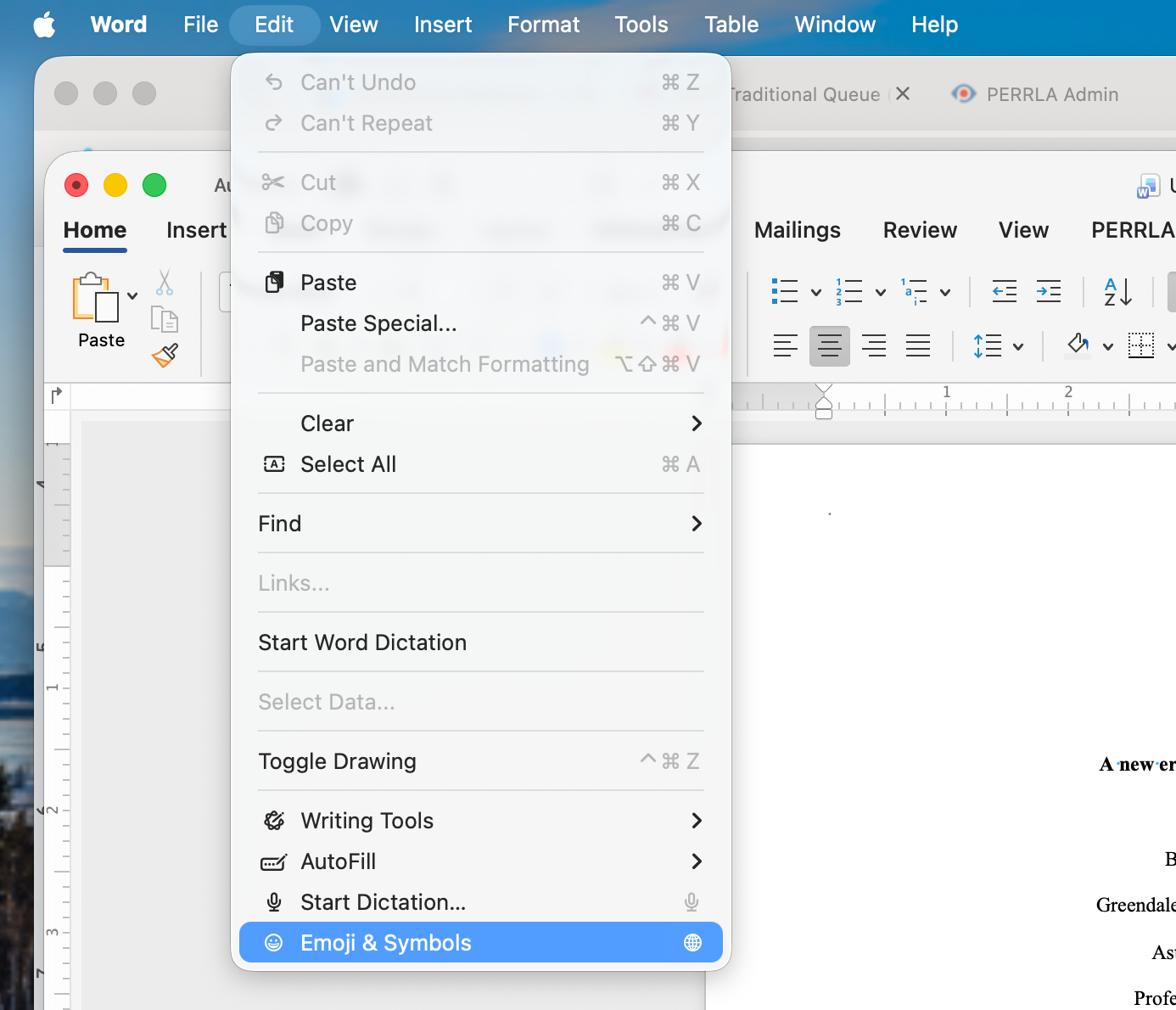
If you're using a Windows computer, you can open the emoji keyboard in Word by pressing the Windows key and the . (period) keys at the same time.
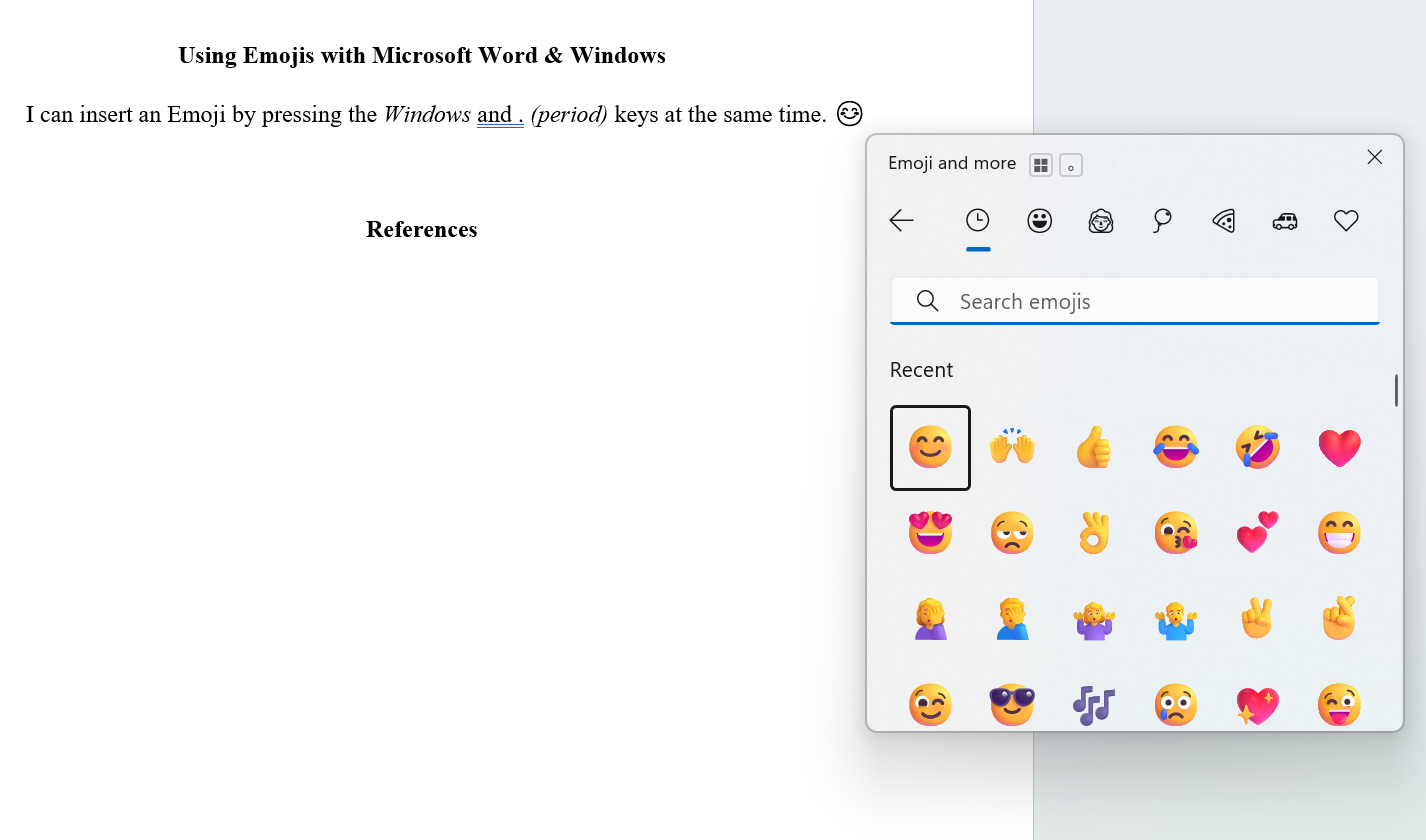
Until we meet again, good writing! And remember, PERRLA has your formatting covered (even the obscure stuff).