How to Cite a Book in MLA 9
Learn the MLA 9 Works Cited format for books — one author, multiple authors, no author, editions, and translations — with in-text citation examples.
PERRLA/Blog/What's New: Summer Feature Roundup
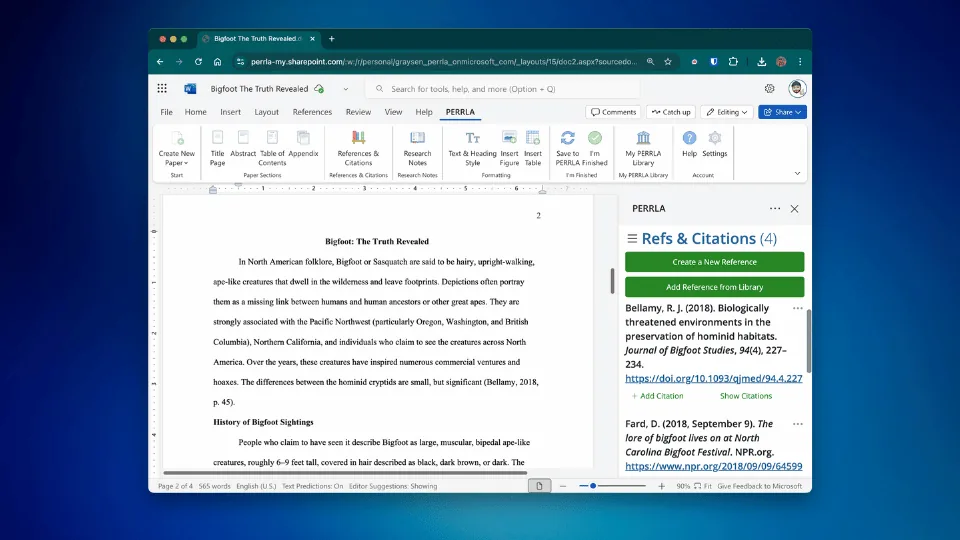
PERRLA’s summer updates add Word for Web support, one-click clean paper downloads, cloud backups, and in-app reference library access. These features streamline academic writing, with more integrations and tools planned to further simplify formatting and citation management.
While you were tackling summer classes, catching up on sleep, or just enjoying a break from school, we were busy behind the scenes making PERRLA even better.
This summer, we launched several new features designed to make writing, citing, and managing your work easier than ever – especially for students using Word for Web. Whether you’re brand new or a longtime PERRLA fan, here’s what’s fresh, what’s helpful, and what’s worth checking out.
After a lot of work (and a lot of waiting on Microsoft), our PERRLA Add-in is now available in Word for Web! 🎉
You can now:
If you’re writing on a Chromebook, working on a shared device, or just prefer to do your writing in the cloud – using PERRLA in Word for Web has you covered!
🔗 Read how to create your first paper in Word for Web
No one wants to turn in a paper full of formatting fields and citation tags. Now, when you’re done writing, just click “I’m Finished!” in the PERRLA ribbon bar.
In the new "I'm Finished!" panel, you can download a clean, submission-ready copy of your paper – perfect for uploading to your school LMS (e.g., Canva, Blackboard) or sharing with your professor.
✅ No tags
✅ No metadata
✅ Just your paper, perfectly formatted
You can now back up your Word papers to your PERRLA account directly from the Word Add-in. In the “Save to PERRLA” panel you can create manual back-ups of your paper to our PERRLA servers. We'll keep it safe as a back-up for you in your account.
Very soon, you’ll be able to access &download these backed-up papers from inside your account in our PERRLA web app (PERRLA Online).
We’ve added a new way to view your entire PERRLA Reference Library in Microsoft Word (in the Desktop & Word for Web apps)!
Now you can:
Everything you’ve built in your PERRLA account is now at your fingertips – even when you’re inside Microsoft Word.
We’ve been working hard to simplify the academic writing process – and this is just the beginning.
Coming soon:
Have an idea? We’re always listening. Let us know what would make your life easier – chances are, we’re already building it.
We’re here to make paper formatting and academic writing simpler, smarter, and less stressful. Now go enjoy what’s left of your summer – we’ll be ready when you are.
Learn the MLA 9 Works Cited format for books — one author, multiple authors, no author, editions, and translations — with in-text citation examples.
Five nursing programs ran full case studies with PERRLA, from a required rollout to one with no requirements at all. Here's what changed for faculty, students, and grades.
Turabian and Chicago are closely related, but they’re not the same thing. Here’s how the two guides differ, which citation system each one uses, and what PERRLA handles automatically when you start a Turabian paper.
PERRLA formats the whole paper in APA 7, MLA 9, and Turabian 9, from the title page to the last reference.
Try PERRLA free for 7 days