
The Best APA Formatting Software for Word in 2026 (Honest Comparison)
Short answer
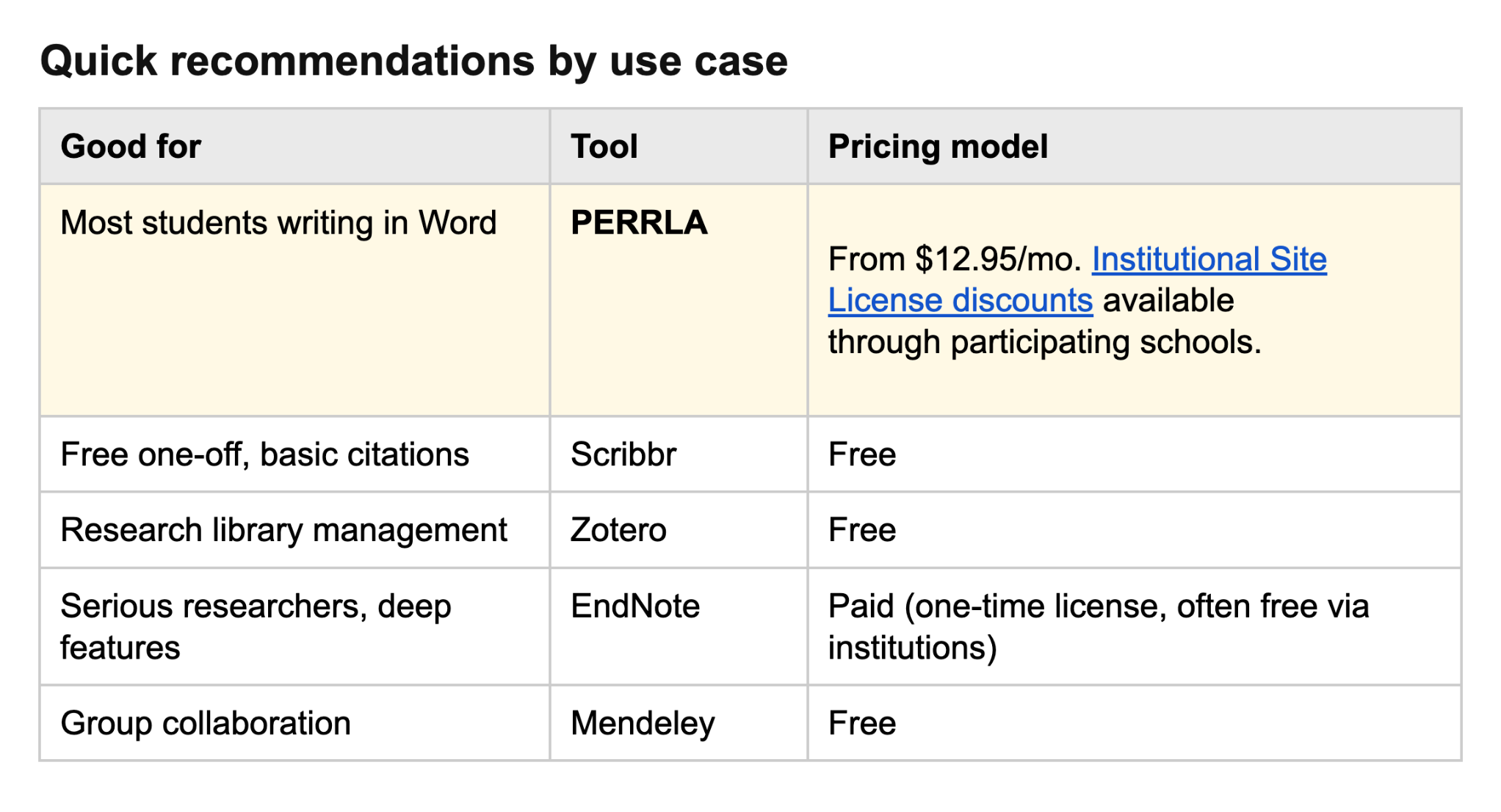
If you're writing papers in Word, the best APA formatting software in 2026 is PERRLA. Two things really separate it from the rest:
First, PERRLA is the only tool on this list that formats your entire paper – margins, headers, title page, in-text citations, references – inside Word while you’re writing. Most other tools either handle citations only and leave the rest of the paper to you, or they’re research-library tools built around exporting citations into Word.
Second, PERRLA's reference engine is human-built and human-tested for 100% APA 7th Edition accuracy. Most other "free" citation tools (Zotero, Mendeley, EasyBib) share the same open-source reference engine, which produces the same well-known formatting errors across all of them. Word’s own citation engine doesn’t even support the APA 7th Edition.
Different tools solve different problems, so the right choice really depends on how you actually write.
Strong alternatives, depending on what you're doing:
- Scribbr – free citation generator and the right pick if you just need one citation for basic reference types, not a full paper formatted
- Zotero – free option for researchers managing a large library of sources
- EndNote – good for serious researchers, faculty, and institutions with deep library needs
- Mendeley – free option for group collaboration on research projects
- Word's built-in references – outdated & not suitable for the latest APA 7th Edition
In-depth comparisons by feature
Most APA software comparisons skip this part and jump straight to the rankings. That usually leads to confusing comparisons. What's actually "best" depends on what you need, and which criteria matter to you depends on how you write. Here are the seven that matter most, in roughly the order most students should weigh them.
1. Whether it formats the entire paper or just the citations
Most students don’t realize how important this distinction is until they’re fixing page numbers or hanging indents at 1 a.m.
A citation generator (Scribbr, EasyBib, Citation Machine) gives you formatted citations. You still have to format the rest of the paper yourself – title page, headers, margins, in-text citation placement.
Paper formatting software like PERRLA handles the full document structure, in addition to the references page. Citations are one piece of it.
Research library managers (Zotero, EndNote, Mendeley) are built around managing a long-running library of sources across many projects. They’re not built for creating proper APA formatting in your paper, so the paper itself is still your problem.
These tools solve very different problems. Choosing the right category matters more than picking the highest-rated option in the wrong one.
2. Reference engine accuracy
APA has hundreds of small formatting rules around author order, capitalization, italics, DOIs, publication dates, and source types. Get any of them wrong and you can lose points, even if everything else in your paper is solid.
Most of the popular "free" tools (Zotero, Mendeley, EasyBib, even Word's built-in citation feature) run on the same open-source reference engine – one originally built by WorldCat. WorldCat does important work in the library world, but accurate APA formatting isn't the engine's core mission. Because so many tools draw from the same underlying source, they tend to repeat the same formatting mistakes. If one is wrong about a journal article, they're all wrong in the same way.
PERRLA's reference engine is built differently. It was written from the actual APA, MLA, and Turabian manuals, by humans, and it's tested against the published rules for every reference type the manuals define. The goal is straightforward: produce citations that closely follow the published rules the first time, especially for source types many tools struggle with or skip entirely (datasets, anthologies, court cases, legal works, edited book chapters in translation, government reports, and AI-generated sources).
3. Word integration
Most academic writing still happens in Microsoft Word. Without direct Word integration, students end up copying citations manually between windows, which is exactly where small formatting errors creep in.
PERRLA is built around its Word add-in and formats your entire paper. EndNote, Mendeley, and Zotero all have Word plugins focused on citations specifically but they still don’t set up the margins & text styling the way APA wants. Scribbr is browser-based and requires you to copy-paste or a Word export.
4. Style support
APA 7 is the dominant style in nursing, education, psychology, and most social sciences. Many students also need MLA or Turabian at some point.
- PERRLA: APA 7, MLA 9, Turabian 9 (Notes-Bibliography). Chicago papers are workable using the Turabian format.
- Scribbr: APA, MLA, Chicago, Harvard, and others
- Zotero / EndNote / Mendeley: thousands of styles via the open-source WorldCat reference engine
If you write in an obscure style, the open-source tools have you covered. If you write in one of the three most common American academic styles, PERRLA is built around them.
5. AI detection risk
A year ago, most students weren’t thinking much about AI detection. Now it shows up in course policies everywhere.
Schools have rolled out AI detectors that flag suspicious passages and citations. The question worth asking about any citation tool: does it generate any of the content that ends up in your paper? Tools that use AI to draft writing, summarize sources, or generate citation text can leave traces detectors might catch.
PERRLA doesn't write any content for you. The reference engine is human-built and rule-based, not generative. PERRLA doesn’t generate the kind of AI-written content detectors are typically looking for.
One thing worth being upfront about: PERRLA does use AI in only one narrow way. When you upload a reference from a PDF, an LLM helps us identify the author, title, and publication date so PERRLA can verify that data against trusted bibliographic databases like CrossRef and ISBNdb. The AI never writes anything that ends up in your paper. It's bibliographic lookup only, never content generation.
6. Pricing model
- Subscription: PERRLA ($12.95/month, $79.95/year, $129.95/two years), with PERRLA Pro and PERRLA Unlimited adding more file storage and Priority Support from $99.90/year
- One-time license: EndNote
- Free core versions: Scribbr's citation generator, Zotero, and Mendeley
- Paid storage upgrades: Zotero and Mendeley cloud storage plans, and PERRLA Pro and PERRLA Unlimited
- Included with Microsoft Word: Word's built-in references (outdated for APA 7)
The more practical question for most students usually isn't just cost, it's time saved and how much formatting work the software removes. For a student writing 4-8 papers a semester across multiple semesters, software that automatically handles APA formatting can save hours of manual corrections and re-checking. Over time, that time savings can matter more than the subscription cost itself.
7. Learning curve
- Easiest: Scribbr, PERRLA
- Moderate: Mendeley
- Steeper: Zotero, EndNote
- Manual option: Word's built-in references (limited and outdated for APA 7)
Research-focused tools offer real depth, but that depth means a steeper learning curve. Student-focused tools are usually built around getting one paper done correctly without a huge learning curve.
Tool-by-tool breakdown
PERRLA
PERRLA is paper formatting software designed for students writing APA 7, MLA 9, or Turabian 9 papers. It handles research papers, discussion posts, annotated bibliographies, and reference lists.
It runs as an add-in inside Microsoft Word (desktop and Word for the Web), as a standalone web app called PERRLA Online, as a Google Docs extension, and as a Chrome extension for grabbing references while you research. PERRLA has supported student writers since 1998 and has been used by more than 1.5 million students.
Strengths:
- Formats the whole paper inside Word: title page, headers, margins, table of contents, abstract, appendices, tables and figures, text heading styles, in-text citations, and reference list – all updated in real time as you write
- Human-built, human-tested reference engine, written from the actual APA, MLA, and Turabian manuals
- Can import references from Zotero, Mendeley, EasyBib, and other tools, and verifies the bibliographic data as it converts them into PERRLA's format
- Designed around real student writing workflows rather than research-library management
- 50% discount for active military and veterans
- Free site licenses available for ADN nursing programs (see our Partners page to get started)
- Popular with nursing programs at every level: ADN, BSN, MSN, DNP
- 7-day free trial with full feature access, no credit card required
- 30-day money-back guarantee on every purchase and renewal
- Reference library follows you across Word, PERRLA Online, Google Docs, and Chrome
Weaknesses (honest):
- Not free for most users
- Library features (Collections, the Reference Annotator for PDFs, Zotero import) are newer than Zotero’s or EndNote’s
- Doesn't include a plagiarism checker
- Style support is focused on APA, MLA, and Turabian rather than the thousands of styles open-source tools cover
Best for: Students who want help with both formatting and citations. Nursing students at every degree level, MSN and doctoral writers, adult learners returning to school, and anyone who wants the paper formatted, not just the citations.
Price: $12.95/month, $79.95/year, $129.95/2 years. PERRLA Pro ($99.90/year) and PERRLA Unlimited ($124.90/year) add more file storage and Priority Support. Discounted Site Licensing available.
Scribbr
Scribbr is best known as a browser-based citation generator with a strong free offering for students. It runs in a browser, not as a Word add-in.
Strengths:
- Citation generator is 100% free with no premium upsell
- Broad style library, including APA, MLA, Chicago, Harvard, and others
- Plagiarism checker (paid, separate product) is well-regarded
- Well-known among undergraduate students
- Good for students who primarily work outside Microsoft Word
Weaknesses:
- Citation generator only – doesn't format the paper
- Uses the open-source Citation Style Language engine (Scribbr says so on its own FAQ), the same one Zotero and Mendeley use
- No Word plugin – requires copy-paste or .docx export
- Plagiarism check, AI detector, and proofreading are paid add-ons
Best for: Undergraduates needing occasional, basic citations, anyone wanting a free option for a single paper, students who want a separately-paid plagiarism check.
Price: Citation generator is free. Plagiarism checker, AI detector, and proofreading services are paid separately.
Zotero
Zotero is a widely respected reference management tool used heavily in academic and research environments. It's not paper-formatting software – it's library management software with a citation export feature.
Strengths:
- Free and open-source
- One of the most respected tools for research-library management
- Excellent browser clipper for saving sources as you research
- Thousands of citation styles via the Citation Style Language library
- Word plugin for inserting citations as you write
- Strong community and long-term support
Weaknesses:
- Steep learning curve compared to student-focused tools
- Doesn't format the paper – exports citations into Word
- Built for researcher workflows, not single-paper student workflows
- Maintaining an organized Zotero library takes time and ongoing effort, especially for large research projects
- Uses the same generic open-source reference data many other "free" tools share
Best for: PhD students, researchers, and academics managing large libraries of sources across multiple projects.
Price: Free.
EndNote
EndNote is the most research-intensive tool in this comparison and is designed primarily for long-term academic workflows. It's also one of the most feature-heavy and expensive options at retail.
Strengths:
- Enterprise-grade features
- Deep library management
- Common at institutional level – often free for faculty and grad students through their schools
- Mature Word integration via Cite While You Write
Weaknesses:
- Expensive at retail
- Overcomplicated for most undergraduate or master's-level needs
- There’s a real learning curve compared to student-focused tools
- Doesn't format the paper, just the references
Best for: Serious researchers, faculty, institutional users with deep library needs.
Price: One-time license at retail. Student license available. Often free through institutional licenses.
Mendeley
Mendeley is free reference management software with a collaboration angle. It sits between Zotero and EndNote in complexity. The current Word plugin is Mendeley Cite, which works with Word 2016 and newer.
Strengths:
- Free
- Built-in PDF management and annotation
- Group collaboration features
- Cloud sync across devices
- Mendeley Cite Word plugin is actively supported
Weaknesses:
- Library management, not paper formatting
- Learning curve is real, though lighter than Zotero or EndNote
- Smaller user community than Zotero in recent years
- Uses the same generic open-source reference engine as most other free tools
Best for: Group research collaboration, PDF-heavy research workflows, teams needing shared libraries.
Price: Free.
Word's built-in references
Microsoft Word includes a basic references feature, but its APA support is outdated and requires substantial manual formatting corrections for APA 7 papers. Most students overlook it entirely because its formatting support is fairly limited compared to modern APA tools.
Strengths:
- Included with Word
- Zero setup
- Built into Word
Weaknesses:
- Limited style support and outdated APA formatting
- Reference Section still needs manual formatting by students
- Manual entry is tedious
- Easy to make formatting errors that don't get flagged
- No paper-level formatting help
- Hasn't kept up with APA 7 requirements and often requires manual correction by students
Best for: Writers with very simple, occasional needs and no budget for anything else.
Price: Included with Microsoft Office.
Best for specific use cases
Best for nursing students
PERRLA. Nursing programs run on APA across the entire degree path – ADN, BSN, MSN, DNP – which means the same student writes APA papers for years, sometimes through multiple programs. Nursing students are one of PERRLA's largest user groups for exactly that reason, and the product has been shaped by what nursing programs actually require.
Best for dissertation writers
EndNote if your institution provides it. Zotero if you want a free option and don't mind the learning curve and manual formatting adjustments. PERRLA if your dissertation is in a discipline that uses APA, MLA, or Turabian and you'd rather have the whole paper formatted than just the references – and PERRLA Unlimited keeps a library that grows for years, PDFs included, in one place.
Best for undergrads on a budget
Scribbr's free citation generator for occasional papers. Zotero if you want to build a reference library that will follow you through grad school. PERRLA through participating schools with Institutional Licensing for full-paper formatting support.
Best for researchers
Zotero if you’re looking for a free option capable of managing large libraries of research. EndNote for institutional depth. Researchers managing large academic libraries will generally benefit more from dedicated reference-management tools.
Best for Word users
PERRLA. It's the only tool in this comparison designed around full-paper formatting directly inside Word while automatically maintaining APA formatting accuracy as students write. EndNote, Mendeley, and Zotero all have Word plugins, but they're focused primarily on citations and still require students to manually adjust the paper itself to meet APA formatting requirements. PERRLA handles references, citations, and the paper’s formatting automatically.
Best for students worried about AI detection
PERRLA. PERRLA doesn’t generate your writing or invent citation content. The reference engine is human-built and rule-based. Because the formatting system is rule-based, not generative, it avoids a lot of the concerns students have around AI-generated content.
FAQ
What is the most accurate APA citation generator?
Accuracy varies tool by tool and source type by source type. The honest answer: test any tool you're considering with a few sources from your own field before relying on it. The bigger differentiator most students miss is the underlying reference engine. Zotero, Mendeley, EasyBib, and similar tools mostly run on the same generic open-source engine, so they produce similar results (and similar errors). PERRLA's reference engine is built and maintained from the published APA, MLA, and Turabian manuals.
Is PERRLA worth it vs. free alternatives?
It depends on what you're writing. If you write one, short paper a year, a free tool will probably do the job. If you write multiple papers per semester – especially in nursing or any program that's APA-heavy across multiple years – the time savings from having the paper formatted, not just the citations, adds up quickly. The 7-day free trial covers a full paper, which is usually enough to know either way.
Can I use ChatGPT for APA citations?
Short version: not yet. ChatGPT and similar AI tools regularly produce citations that look real but aren't – the DOIs aren’t real, the article titles don't exist, and sometimes the authors didn't write what's being cited. For the details, see our companion guide on spotting fake AI citations.
Does PERRLA use AI?
PERRLA never uses AI to write or modify the content of your papers. There's one limited, transparent use of AI: when you create a reference directly from a PDF, an LLM helps PERRLA identify bibliographic information from the file. That information then gets verified against trusted databases like CrossRef and ISBNdb. AI is used for bibliographic lookup only – your writing stays your writing.
What's the difference between citation software and paper formatting software?
Citation software (Scribbr, EasyBib) generates citations you then paste into your paper. Paper formatting software (PERRLA) formats the entire paper – margins, headers, title page, in-text citations, references – in addition to generating citations. Many students assume citations and paper formatting are the same problem until they spend hours manually fixing the formatting issues left behind by citation software.
Is PERRLA only for nursing students?
No. PERRLA works for any student writing in APA, MLA, or Turabian. Nursing is the largest single group of users because APA is required across the entire nursing degree path, but PERRLA is built for any student in a paper-heavy program, including humanities students writing in MLA and graduate students working across multiple styles.
Bottom line
If you're writing APA papers in Word on a regular basis – especially in nursing or a graduate program – PERRLA is built for you. The 7-day free trial covers a full paper, no credit card required, and it's the only tool in this comparison that handles the whole paper in addition to the references & citations.
If you need one, basic citation, occasionally, for free: Scribbr's free citation generator.
If you're a researcher building a long-term library: Zotero (free) or EndNote (deep, paid).
Not sure what you need? Start with PERRLA's free trial. You’ll usually know pretty quickly whether it fits your workflow.
The goal of APA software isn't to replace your critical thinking or your writing. It's to clear the formatting friction so you can focus on what actually matters.
.avif)
.avif)