APA formatting is detail-heavy, surprisingly easy to get wrong, and – if you're getting graded on it – genuinely worth getting right. This guide covers the essentials: how an APA 7 paper is set up, how citations and references work, where writers most often go wrong, and how PERRLA takes most of it off your plate.
Staying current with APA style is a documented challenge. Formatting errors appear consistently in student and academic writing, often stemming from unfamiliarity with the guidelines or confusion between older editions.
Common APA 7th Edition Citation Errors
Research consistently shows that students and researchers make predictable, recurring mistakes in APA citation and referencing – from missing citations to incorrect author formatting. Addressing these patterns is essential for maintaining academic integrity and avoiding lost points (Iqbal et al., 2024).
APA formatting is built around three priorities: clarity, consistency, and giving credit where it's due. The formatting rules aren't arbitrary – they exist so that readers can follow an argument without getting distracted by inconsistent presentation.
The core page setup requirements for APA 7 student papers:
PERRLA sets all of this up automatically when you create a paper. You never have to touch a margin setting.
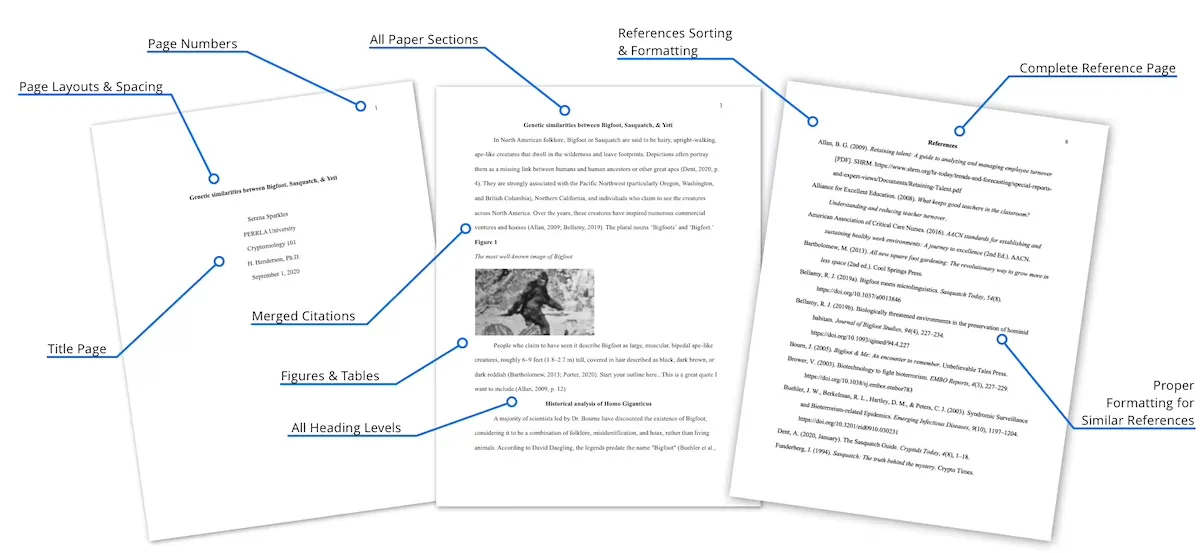
A standard APA 7 student paper includes four main sections, each with its own formatting rules:
Title Page – Includes the paper title, your name, institutional affiliation, course name, instructor name, and due date. All centered, double-spaced. Student papers in APA 7 do not include a running head.
Abstract – A brief summary of the paper (typically 150–250 words), on its own page. Not always required – check with your instructor.
Body – Organized with an introduction (no heading needed), followed by clearly labeled sections. The paper's title appears at the top of the first body page.
References – Starts on a new page. Titled "References" (centered, bold). All sources cited in the paper listed alphabetically, with hanging indent formatting.
APA 7 uses five heading levels to organize a paper hierarchically. You only use as many levels as your paper actually needs – most student papers use two or three.
PERRLA inserts all five headling levels correctly with a single click.
In-text citations in APA 7 follow the author-date format. Every time you use someone else's idea – whether you quote it directly or put it in your own words – you include a citation in the text.
In-text citation format can be confusing, particularly for writers navigating the distinction between narrative and parenthetical citations (Sharma et al., 2025).
APA 7thg Edition In-Text Citation Guide
APA 7 includes multiple citation types and subtypes with distinct formatting patterns. Research into how writers apply these guidelines shows that in-text citation is one of the most frequently misunderstood components of APA style (Sharma et al., 2025).
The two citation types:
Parenthetical – Source information appears in parentheses at the end of the sentence: (Smith, 2020)
Narrative – The author's name is part of the sentence; only the year goes in parentheses: Smith (2020) found that...
Key rules by author count:
The reference list is where every source cited in your paper gets its full entry. A few non-negotiables:
Book: Last, F. M. (Year). Title of book in italics. Publisher.
Journal article: Last, F. M. (Year). Title of article in sentence case. Journal Name in Italics, Volume(Issue), page–range. https://doi.org/xxxxx
Website: Last, F. M. (Year, Month Day). Title of webpage. Site Name. https://www.url.com
The most frequent errors researchers and students encounter:
The fastest way to avoid all of these is to let PERRLA handle the formatting while you write.
.avif)
PERRLA was built specifically around APA formatting rules – not adapted from a general-purpose tool. When you start a paper in PERRLA, your margins, spacing, fonts, and title page are already correct. As you write, PERRLA:
You don't have to memorize hanging indent settings or wonder if your DOI is formatted correctly. PERRLA handles it.
Here's the short version:
PERRLA's built-in Reference Engine generates citations and formats them according to APA 7 guidelines automatically. When you create a paper, PERRLA sets up the title page and document structure. As you write, you insert citations through the PERRLA panel and they're added to your reference list in real time. Edit a source and everything updates automatically.
PERRLA works with Microsoft Word 2016 or newer on Windows and Mac (Word 2019 or later preferred), Word for Web, and the Microsoft Word app for iOS. It's installed from the Microsoft Word Add-in Store – no separate download needed.
PERRLA's US-based support team is available every day until 10pm Central (Monday through Friday 10am–10pm, weekends 1pm–10pm). You can reach them at support@perrla.com or browse the Help Center at perrla.zendesk.com.
Iqbal, B., Cheema, M. I., & Shaheen, R. (2024). Analyzing the errors in citation and referencing in American Psychological Association (APA) style seventh edition. Journal of Asian Development Studies, 13(2).
Sharma, U. N., Karki, T. M., & Banjade, G. (2025). Understanding in-text citations in academic writing: A review of APA 7th edition guidelines. TULSSAA Journal, 12(1), 63–82. https://doi.org/10.3126/tulssaa.v12i1.77260
✔️ Great for testing how PERRLA works for you
✔️ Access to all PERRLA features & software
✔️ No credit card required!
✔️ For 1 year – or $12.95 a month, or $129.95 for 2 years
✔️ Access to all PERRLA features & software
✔️ 2 GB of storage, with files up to 10 MB
.avif)
.avif)