.png)
PERRLA is comprehensive academic writing software that formats the entire paper from blank document to finished submission. Scribbr is a citation generator with a strong free tier and a built-in plagiarism checker. They’re different tools built for different kinds of writing workflows, and the better fit depends on the kind of work you’re doing.
If you write papers in Word, Google Docs, or PERRLA's web app and need APA, MLA, or Turabian done correctly throughout the whole document (not just the references), PERRLA is built for you. If you need a free one-off citation, a plagiarism scan, or your required style isn't APA, MLA, or Turabian, Scribbr is the stronger pick.
Here's the full breakdown.
PERRLA is best for: Students writing full papers in APA, MLA, or Turabian who want every element of the document formatted correctly from the start - title page, headings, citations, references, tables, appendices. Especially strong for nursing students, MSN, doctoral writers, and anyone writing multiple papers across multiple semesters where small citation issues add up over time.
Scribbr is best for: Undergraduates who need free citation generation for a single assignment, students who want a quick plagiarism check, and writers in styles outside APA, MLA, or Turabian.
.png)
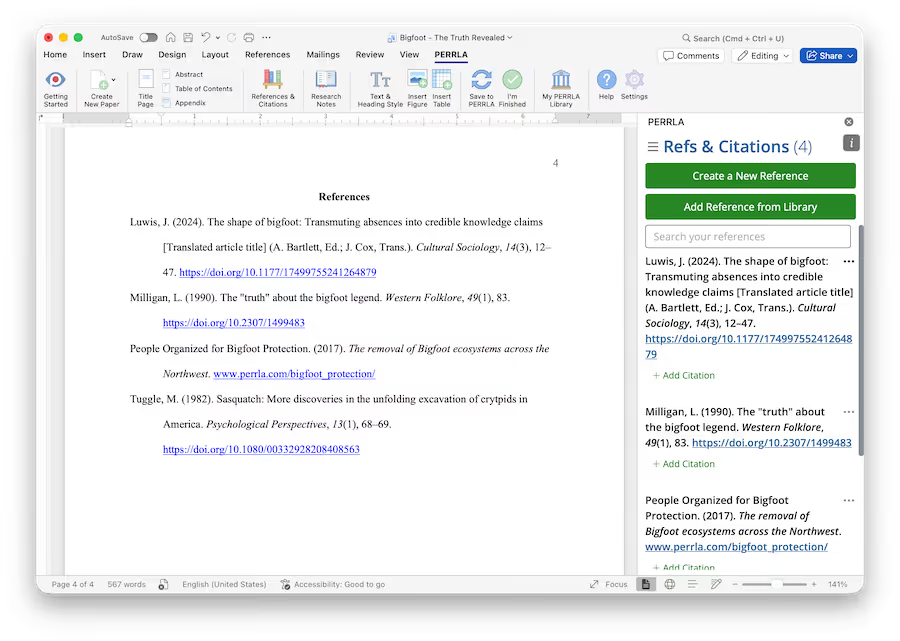
PERRLA's reference engine was built from scratch using the APA 7 manual as both the blueprint and the answer key. Every reference type documented in the manual is supported, and accuracy is verified directly against the manual itself.
This is probably the biggest structural difference between PERRLA and most other citation tools. Most citation tools on the market - Zotero, Mendeley, EasyBib, Citation Machine, Cite This For Me, and the broader landscape of automated generators - rely on the same open-source reference engine maintained by WorldCat. WorldCat does important library work, but accurate APA formatting is not the engine's core purpose. The result is a lot of tools that look different on the surface but make many of the same formatting mistakes underneath.
For students, those inconsistencies show up in small but graded places: a wrong italicization on a journal title, an author block with a misplaced comma, a DOI that's formatted correctly but doesn't resolve. PERRLA is designed so students can get accurate formatting without needing to understand the formatting rules themselves. You fill in the information and the formatting follows the manual.
Reference type coverage is the second piece of this. PERRLA supports reference types that the standard generator engine cannot fully produce: datasets, anthologies, legal works, court cases, and other less common types that show up in nursing research, law adjacent coursework, and graduate-level writing. If you've ever tried to format a court case in a free citation generator and ended up cleaning it up by hand, this is the gap PERRLA closes.
This is probably the simplest way to think about the difference. PERRLA is an academic writing software. Scribbr is a citation generator.
PERRLA handles the full document from blank file to submission:
• Document setup: margins, page sections, styling
• Title pages
• Table of contents
• Abstracts
• Appendices
• Tables and figures
• Heading styles
• References page and in-text citations, updated in real time as you write
Supported paper types include research papers, discussion posts, reference lists, and annotated bibliographies.
Scribbr does one part of this job. You write your paper somewhere else, then generate the citations and bibliography on Scribbr's site and copy the output back into your document. The formatting of the paper itself - margins, headers, title page, in-text citation insertion, heading styles - is on you.
To be fair, that’s what Scribbr is built for. But on a 12-page nursing paper with 18 references, the difference between automatic formatting and manually pasting citations starts to add up pretty quickly over a semester.
PERRLA is designed to help students format papers correctly from the beginning.
PERRLA works across the platforms students actually write in:
• Microsoft Word - desktop application and Word for Web
• Google Docs - native integration
• Google Chrome extension - builds references while you research, before you even open your paper
• PERRLA Online - browser-based writing tool that exports to Word
The formatting and reference experience stays consistent across all four platforms. You’re getting the same formatting system regardless of where you write.
Scribbr is browser-based by design. There's no Word add-in, no Google Docs add-in, no Chrome extension that builds your library while you research. You go to scribbr.com, generate a citation, copy it, paste it.
In practice, the difference comes down to this: if you do all your work in a browser and only need citations (not full-paper formatting), Scribbr's browser-first design is fine. If you write in Word or Google Docs and want the formatting work to happen inside your document, PERRLA's coverage is broader.
.png)
PERRLA is $79.95 per year, $12.95 per month, or a discounted 2-year plan. Associate level programs can get a free Site License - email us at schools@perrla.com to learn more. Scribbr offers a free citation generator, while plagiarism checking is priced per document: $19.95 for up to 7,500 words, $29.95 for 7,500 to 50,000 words, and $39.95 for documents over 50,000 words.
The practical comparison is this: if you need one citation for one assignment, Scribbr's free tier is the right call. If you're going to write four to six papers this semester, PERRLA's all-in-one approach almost certainly saves more time than the price tag costs. For students writing multiple papers, the time savings usually become noticeable pretty quickly.
For students in longer programs - nursing students moving through BSN to MSN to doctoral, education students working toward administration, anyone with multiple programs ahead - PERRLA tends to become more useful over time. You can keep using the same system across multiple programs and degree levels, and the reference library you build in year one carries through year five.
PERRLA doesn’t generate content. It does not write your paper, rewrite your sentences, suggest paragraphs, or alter the content you've written. PERRLA only formats the content the student has already produced. PERRLA also makes only standard spelling suggestions, deliberately, to avoid altering a student's voice the way tools like Grammarly can.
Because PERRLA doesn't touch your content, PERRLA itself doesn't introduce AI-generated text patterns into your paper. If a student uses AI elsewhere or plagiarizes, that's content the student placed into the paper - PERRLA has no involvement in what's written.
That distinction matters for faculty and schools trying to enforce academic integrity policies. A tool that formats but doesn't write is structurally different from a tool that generates or rewrites.
PERRLA does use LLM technology in one specific, disclosed place: when creating a reference directly from a PDF, PERRLA may use an LLM to identify bibliographic elements (author name, title, publication date). That extracted information is then used to look up verified bibliographic data in reputable third-party databases including CrossRef and ISBNdb. This is AI used only for bibliographic identification - it never touches the content of the paper.
Scribbr is a citation generator. Its standard generator output isn't designed to introduce AI patterns into your prose either, since it's also formatting, not writing. This isn’t really a question of one tool being ‘safe’ and the other being ‘unsafe.’ The real difference is that PERRLA's full-document scope and human-built reference engine give faculty and institutions a tool whose behavior around academic integrity is clearly documented and easy to verify.
Scribbr supports a much broader range of citation styles - hundreds across various academic disciplines.
PERRLA supports the three styles that cover the vast majority of American higher-education writing: APA, MLA, and Turabian. If your program uses one of those three (and for most US students in nursing, education, social sciences, humanities, and theological studies, it does), PERRLA covers you. If your program requires Chicago author-date, AMA, Vancouver, IEEE, or one of the more specialized styles, Scribbr is the better fit.
Scribbr’s paid tier includes a plagiarism checker that runs your paper against published sources. PERRLA does not offer a plagiarism checker.
If a plagiarism scan is part of your pre-submission workflow, Scribbr handles it natively. PERRLA users who want this typically pair PERRLA (for writing and formatting) with a separate plagiarism tool, often Turnitin access provided through their school.
We're not going to dress up PERRLA as better at everything, because it isn't, and pretending otherwise would make the comparison less useful.
Scribbr does several things better than PERRLA:
1. Free tier for one-off citations. If you need a single citation for a single assignment, Scribbr's free generator is faster than signing up for any subscription tool.
2. Broader style library. Hundreds of styles vs. PERRLA's three. If you're writing in a less common style - Chicago author-date, AMA, Vancouver, IEEE - Scribbr probably supports it and PERRLA doesn't.
3. Built-in plagiarism checker. PERRLA doesn't have one. Scribbr does.
4. Lower barrier to entry. No account required for the free generator. No install. Just open the site and use it.
Choose PERRLA if:
• You write multiple papers per semester
• You write in Word, Word for Web, or Google Docs
• You're a nursing student, MSN, or doctoral writer
• You need APA, MLA, or Turabian
• You want the entire paper formatted, not just the citations
• You work with less common reference types (datasets, legal works, court cases)
• You want clear, documented separation between formatting tools and content generation
Choose Scribbr if:
• You need one citation for one assignment
• You write in a style PERRLA doesn't cover (Chicago author-date, AMA, Vancouver, IEEE)
• You need a built-in plagiarism check
• You're cost-constrained and the free tier covers your needs
Switching over is pretty straightforward. PERRLA's 7-day free trial gives you full access without payment.
If you've built a reference library in another tool, PERRLA imports references directly and verifies and corrects the bibliographic information as part of the import. That means references coming in from a generic citation generator get checked against PERRLA's APA, MLA, or Turabian standards rather than being trusted as-is.
Former Scribbr users usually notice a few things right away:
• Citations and references update inside the document as you write, no copy-paste from a separate site
• The whole paper gets formatted - title page, headings, tables, appendices - not just the bibliography
• It’s easier to keep formatting consistent across a long paper, which matters once grading starts
• The Chrome extension lets you build your reference library while you research, before you even open the paper
.png)
“It literally saved me HOURS of time and energy. There are so many "generators" out there and none of them come close to the perfection that is PERRLA.”
— Rodney D., Student
“PERRLA has been so helpful for me when just starting school! It's been very helpful when citing my sources. I've done a lot of research in trying to find what specific website can help me do these citations. I've searched everywhere and there hasn't been one up to date as PERRLA!”
— Patrick K., Student
“I'm a Doctoral student currently and I've been using PERRLA at least for the past year...There's others that you can use but they don't compare as far as just the UI and how simple it is to use PERRLA. I'm a fan.”
— Alex I., Student
It depends on what you're writing. For full papers in APA, MLA, or Turabian where accuracy matters across the whole document, PERRLA is the better tool. For one-off citations, broader style coverage, or built-in plagiarism checking, Scribbr is the better tool. They solve different problems.
Yes. PERRLA offers a 7-day free trial with full access, and references built in other tools can be imported. During the import, PERRLA verifies and corrects the bibliographic information so it matches APA, MLA, or Turabian standards.
Scribbr does not have a Microsoft Word add-in. Users generate citations on the Scribbr website and copy them into their Word document. PERRLA installs as a Word add-in (and also works in Word for Web, Google Docs, and PERRLA Online) and formats the paper directly inside the document.
Scribbr offers a free citation generator. Plagiarism checking is priced separately per document, starting at $19.95 for documents up to 7,500 words, $29.95 for documents between 7,500 and 50,000 words, and $39.95 for documents over 50,000 words. Other services, including proofreading and editing, are also paid separately.
PERRLA's reference engine was built from scratch using the APA 7 manual as the blueprint, and accuracy is verified directly against the manual. Most citation generators on the market - including Zotero, Mendeley, EasyBib, and Citation Machine - rely on a shared open-source engine maintained by WorldCat, which produces known inconsistencies. PERRLA's engine also supports reference types (datasets, legal works, court cases) that the shared engine cannot fully produce.
PERRLA never uses AI to generate or alter the content of a paper. The one specific, disclosed use of LLM technology is during PDF reference creation, where an LLM helps identify bibliographic elements (author, title, date) that are then verified against third-party databases like CrossRef and ISBNdb. The student's writing is never touched.
No. PERRLA doesn't generate or rewrite content, so it doesn't introduce AI-generated text patterns into your paper. PERRLA only formats the content you've already written. If a paper gets flagged for AI use, that comes from content the student placed into the paper, not from PERRLA.
PERRLA is $79.95 per year (about $6.66/month). While Scribbr offers a free citation generator, students who write more than a paper or two quickly run into its limits: plagiarism checks cost extra ($19.95–$39.95 per document), and you're stuck copying citations one at a time into Word. PERRLA works directly inside Word and Google Docs, formats your entire paper to APA or MLA standards automatically, and includes unlimited citations, references, and paper formatting for one flat annual price. For any student writing regularly, that's a few dollars a month to stop fighting with formatting.
Try PERRLA free for 7 days. No credit card required. Install the Word add-in, open Google Docs, or start in PERRLA Online - the experience is consistent across all of them, and you can format your next paper before you decide whether to subscribe.
✔️ Great for testing how PERRLA works for you
✔️ Access to all PERRLA features & software
✔️ No credit card required!
✔️ Access to all PERRLA features & software
✔️ Great for exploring PERRLA's functionality
✔️ Our most affordable option
.avif)
.avif)