


When you’re working on a research paper, the actual writing is only half the job. First, you have to research, and that’s where things can get messy. A PDF open in one window, notes in another, and by the time you sit down to write, you can’t remember which article had that perfect quote, let alone what page it was on.
The PERRLA Reference Annotator fixes this by putting your reading, your notes, and your paper in one place.
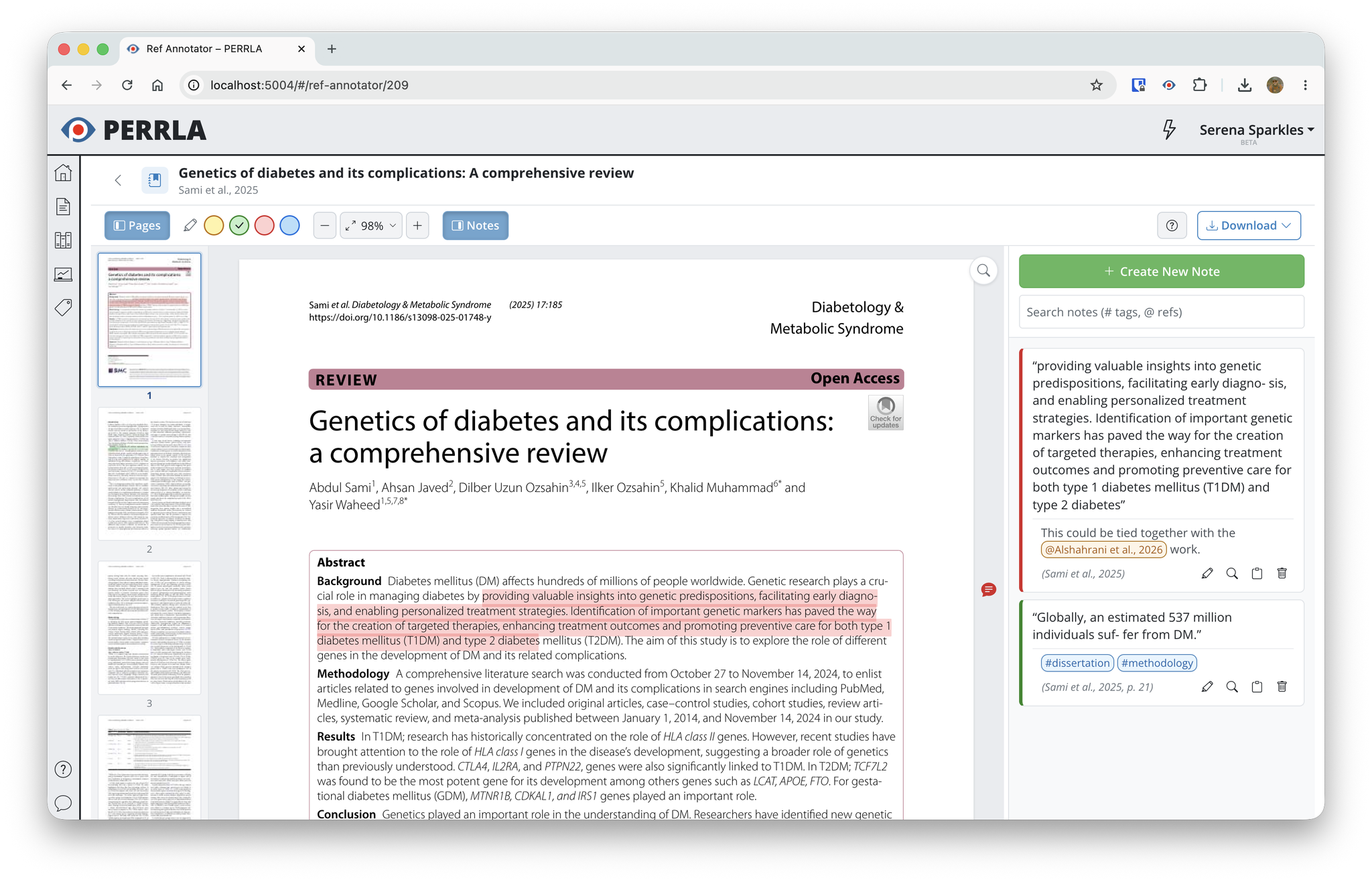
How the Reference Annotator works
Any reference in your PERRLA library can have a PDF attached to it – the actual article you’re citing. Click on a reference in the PERRLA Online Reference tab, click View file, and instead of downloading it or opening another app, the article opens right inside PERRLA in a full-screen reading view. Your source is now where you’re already working.
Highlight and annotate as you read
As you read, you can mark up the document the same way you would on paper. Select any passage and a small menu appears with four highlight colors. Pick one, and the highlight is saved.
The highlight colors don’t have any assigned meaning. You might use yellow for key findings and green for direct quotes you plan to use, or no system at all. The choice is yours.
When a passage sparks a thought, go one step further and add a comment. A note card opens right beside the text where you can capture your reaction, a question, or how you plan to use the passage in your paper. If an idea isn’t tied to any particular sentence, you can drop a standalone note anywhere along the edge of the page. Either way, your notes stay anchored to their spot in the document, scrolling along with the PDF so your thinking always sits next to its source.
Tags and connections across your sources
Your notes can do more than sit in the margins. As you write one, add a #tag to mark a theme – #methods, #limitations, or whatever you’re tracking across your research. You can also type @ to connect a note to another reference in your library.
Tag the same theme across three or four different articles, and you can start to see your sources talking to each other. Those connections are what a strong paper is made of, and with the Reference Annotator, they take shape while you read rather than after the fact.
Your annotations become Research Notes
Not everything you capture while reading is headed straight into the paper as a quote, but it’s all raw material you’ll want later to build a solid argument. That’s why everything you create in the Reference Annotator is automatically saved as a Research Note.
When you sit down to write, open the Research Notes panel in the Paper Editor, and it’s all there – every highlight, every comment, organized by source. You’re not starting from a blank page. You’re starting from everything you already found. And when you’re ready to use a note, you can drop it straight into your paper.
The full research-to-writing flow
The Reference Annotator is designed around a simple workflow:
- Attach a PDF to a reference in your PERRLA library
- Open it in the Annotator and read it in PERRLA
- Highlight passages and add notes as you go
- Find your annotations waiting in the Research Notes panel when you write
- Drop them directly into your paper
Read once, capture as you go, and never lose track of a source again.
How to access the Reference Annotator
The Reference Annotator is available now in PERRLA Online. Open any reference that has a PDF attached, click View file, and the Annotator opens automatically. Every PERRLA subscription includes access to PERRLA Online, so if you’re already a subscriber, it’s ready to use.
Not using PERRLA yet? Try it free for 7 days – no credit card required.