PERRLA for Word: Complete Guide to the APA Formatting Add-in

If you've written an APA paper, you already know the frustration – the hanging indents, the DOI formatting, the page headers, the reference list that somehow still doesn't look right. PERRLA for Word was built to take all of that off your plate.

This guide walks through what the PERRLA Add-in does, how to get it set up, & why it's worth using over Word's built-in tools or free citation generators that only "sort of" work.
Staying current with APA style is a documented challenge for students and researchers across disciplines. Formatting errors show up consistently in submitted manuscripts, affecting academic integrity and often costing students points – not because the ideas are weak, but because the details are wrong.

Adhering to APA Style: Challenges and Guidelines

APA formatting presents consistent difficulties for researchers – from evolving referencing standards to formatting nuances that even experienced writers get wrong. The APA Manual provides guidance across writing style, referencing, and methodological considerations, but understanding its scope and limitations requires ongoing attention (Daniel & Onwuegbuzie, 2007).

Comprehensive Guide to PERRLA for Word – APA Formatting Add-in

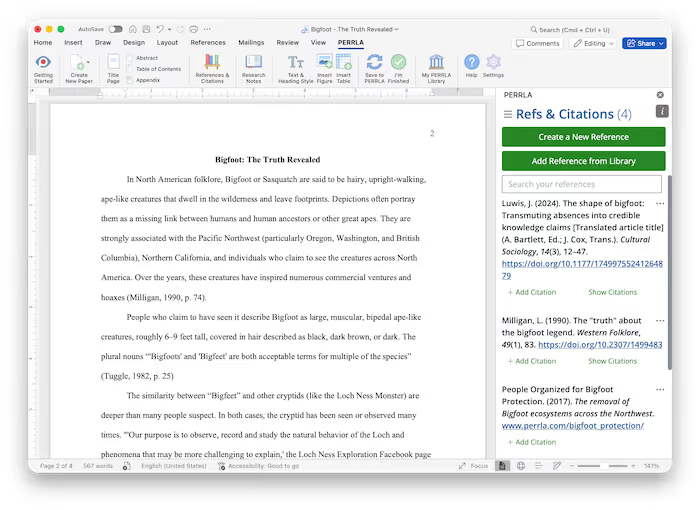
PERRLA for Word integrates directly into Microsoft Word and handles the parts of APA formatting that eat up your time: citation generation, reference list building, and paper setup. The goal is simple – you focus on writing, PERRLA handles the formatting.

Digital tools for citation and referencing have improved significantly, though research notes that students and academics still underutilize them or bypass citation guidelines entirely.

Adhering to APA Style: Challenges and Guidelines

Digital Tools for Citation: Simplifying Academic ReferencingDigital technologies have made meaningful progress in addressing citation and referencing challenges in academic writing. Citation and reference tools now offer real capabilities for reducing errors and saving time – but their value depends on students and academics actually using them and abiding by established citation principles (Ochieng, 2019).

Overview

PERRLA serves students, researchers, and professionals who need to write in APA style. Its core functions include automatic citation generation, reference list creation, and complete paper setup – including title pages, section headings, and in-text citations. Everything happens inside Word, so your workflow stays in one place.

What Are PERRLA's Key Features for APA Citation Automation?

A few things that make PERRLA worth using:

  • Human-built Reference Engine – Built directly from the APA 7th Edition Manual, not adapted from a generic tool. It covers every source type accurately and updates as guidelines change.
  • Automatic formatting – Citations and references update in real time as you write and edit. Your reference list stays in sync automatically.
  • Native Word integration – PERRLA lives in a ribbon tab inside Microsoft Word. No switching apps, no copy-paste errors, no formatting drift.

Not all citation tools deliver the same accuracy. Research evaluating free web-based citation generators found significant variation in how well they handle APA, MLA, and Chicago formatting – and that students unfamiliar with the style often couldn't spot the errors themselves (Chang, 2013).

Evaluating Citation Generators for APA Style Accuracy

Free web-based citation generators vary widely in how accurately they produce APA, MLA, and Chicago citations. Tools designed for ease of use don't always prioritize accuracy – and students who don't yet know the style well are often unable to catch the mistakes those tools introduce.

PERRLA takes a different approach – a rules-based engine built specifically around APA guidelines, managing citations inside your document rather than generating output you paste in and hope for the best.

Installation

PERRLA isn't a traditional download. You install it from inside Microsoft Word:

  • Open Microsoft Word on your computer
  • On the Home tab, select Add-ins
    On older versions of Microsoft Word, this may be located in the Insert ribbon tab.
  • Search for PERRLA and select the PERRLA Word Add-in from the results.
  • Click the "Add" button beside PERRLA
  • Follow the setup prompts & PERRLA will help you create a new paper right away

That's all there is to it – it takes about one minute to be in your new APA 7 paper.

Usage Tips

A few habits that make PERRLA work better for you:

  • Let PERRLA create your paper –PERRLA will set up your document from the beginning. Margins, spacing, headers, and title page are all handled automatically.
  • Build your reference list as you write – Add sources as you research, not after. PERRLA keeps everything organized and updates citations in real time.
  • Use the References & Citation panel – Place your cursor where you want a citation and insert it directly from the PERRLA panel. No manual formatting required.

Benefits of Using PERRLA

Here's the short version:

  • Less time on formatting – PERRLA handles the formatting mechanics so you can focus on your argument and your ideas.
  • Fewer citation errors – A rules-based engine built from the APA 7 Manual means fewer mistakes and a reference list you can actually trust.
  • A workflow that doesn't fight you – Everything is built around the citation process. No menu diving, no workarounds.
Feature
What It Does
Why It Matters
Human-Built Reference Engine
Formats citations correctly from a rules-based APA engine
Reduces errors that generic tools introduce
Automatic Formatting
Updates citations and references in real time
Keeps your document APA-compliant without constant manual fixes
Microsoft Word Integration
Everything happens inside your document
No copy-paste errors, no app switching, no formatting drift

Conclusion

Word is a great word processor. PERRLA is a great APA tool. They're not really competing for the same job.

If you're writing academic papers and formatting accuracy matters – and if you're getting graded on it, it does – PERRLA gives you a dedicated Reference Engine, automatic updates, and a workflow built around citation. Give it a try and see how much easier your next paper is to put together.

FAQ's

How does PERRLA automate title pages, in-text citations, and reference lists?

PERRLA's built-in Reference Engine generates citations and formats them according to APA 7 guidelines automatically. When you create a paper, PERRLA sets up the title page and document structure. As you write, you insert citations through the PERRLA panel and they're added to your reference list in real time. Edit a source and everything updates automatically.

Is PERRLA compatible with all versions of Microsoft Word?

PERRLA works with Microsoft Word 2016 or newer on Windows and Mac (Word 2019 or later preferred), Word for Web, and the Microsoft Word app for iOS. It's installed from the Microsoft Word Add-in Store – no separate download needed.

What support options are available for PERRLA users?

PERRLA's US-based support team is available every day until 10pm Central (Monday through Friday 10am–10pm, weekends 1pm–10pm). You can reach them at [email protected] or browse the Help Center at perrla.zendesk.com.

References

Daniel, L. G., & Onwuegbuzie, A. J. (2007). Effective use of APA style in manuscript preparation. Research in the Schools, 14(1), i–x.

Chang, H.-F. (2013). Cite it right: Critical assessment of open source web-based citation generators. LOEX Conference Proceedings 2011.

Ochieng, D. (2019). The progress of digital technologies in solving chronic education challenges: The case of citation and referencing errors. Journal of Learning and Teaching in Digital Age, 4(2), 33–41. https://eric.ed.gov/?id=EJ1325217

Pick your perfect plan

Subscribe for as long as you want & save along the way
7-Day Free Trail
$0

✔️ Great for testing how PERRLA works for you

✔️ Access to all PERRLA features & software

✔️ No credit card requried!

Try PERRLA for 7 Days
Monthly
$12.95

✔️ Access to all PERRLA features & software

✔️ Great for exploring PERRLA's functionality

✔️ Our most affordable option

Subscribe Now
1 Year
$79.95

✔️ Save 50% over 12 Months

✔️ Access to all PERRLA features & software

✔️ Excellent choice for full-time students

Subscribe Now

Most Popular

2 Years
$129.95

✔️ Save 35% over 1 Year

✔️ Great value for Masters & Doctoral students

✔️ Access to all PERRLA features & software

Subscribe Now

Questions? Let's chat – real humans here

Image of students gathered around a desk

PERRLA for your institution

Ready for your students to turn in better papers? Check out our Partners page to learn how PERRLA can help your institution's students succeed.
Image of student typing at a laptop

Talk to support

Email us for a fast, clear response. Check out our Help Center for articles, tutorials, and videos on using PERRLA.
Email PERRLA Support