

AI writing detectors are everywhere right now. And so is the anxiety that comes with them – for faculty who aren’t sure what the results actually mean, and for students who worry about being flagged for writing that is really their own.
PERRLA’s Writing Timeline takes a different approach entirely. Rather than scanning the finished paper for statistical patterns and returning a verdict, it shows faculty how the paper was built: the writing sessions, how the paper grew over time, and when sources were added and cited. It doesn’t make an accusation. It gives you something concrete to ask about.
What the Writing Timeline shows
Every research paper written in PERRLA Online or the PERRLA Word Add-In generates a Writing Timeline automatically. When your institution enables the feature, each paper’s title page includes a link that faculty can click to open the record. Here’s what they’ll see:
- A growth chart of the paper’s length across every writing session – a visual record of how the paper grew over time.
- Session-by-session detail: Words written and removed while revising, references added, citations inserted, and structural changes like new sections, tables, or figures.
- When sources arrived – whether research came in alongside the writing or all at the very end.
- Summary totals: Active writing time, number of sessions, final word count, references, and citations.
The record captures what happened session by session. A paper written steadily across several sittings – with text added and revised, sources integrated along the way – looks very different from a paper where two large blocks of text appeared minutes apart, nothing was revised, and every source was added in the final session.
The timeline doesn’t label either one. That’s the faculty’s job.
What it never shows
The Writing Timeline was designed with student privacy and faculty fairness in mind from the start. It deliberately excludes information that could be used to penalize students for how or when they chose to work:
- The student’s own writing. The timeline shows only the names of sources added and cited – never the student’s text, headings, or titles.
- Dates or clock times. Time is shown relative to when the paper was started, not as calendar dates or times of day. When a student chose to work can’t color the grade.
- Scores, AI verdicts, or labels on anyone’s pace or process.
The record is not a determination. It shows the work behind the paper, session by session, and leaves the reading to you.
Two papers, two very different pictures
To illustrate what faculty actually see, here are two invented samples – not real student work, but representative of what different writing patterns look like in the timeline.
Written over several sittings
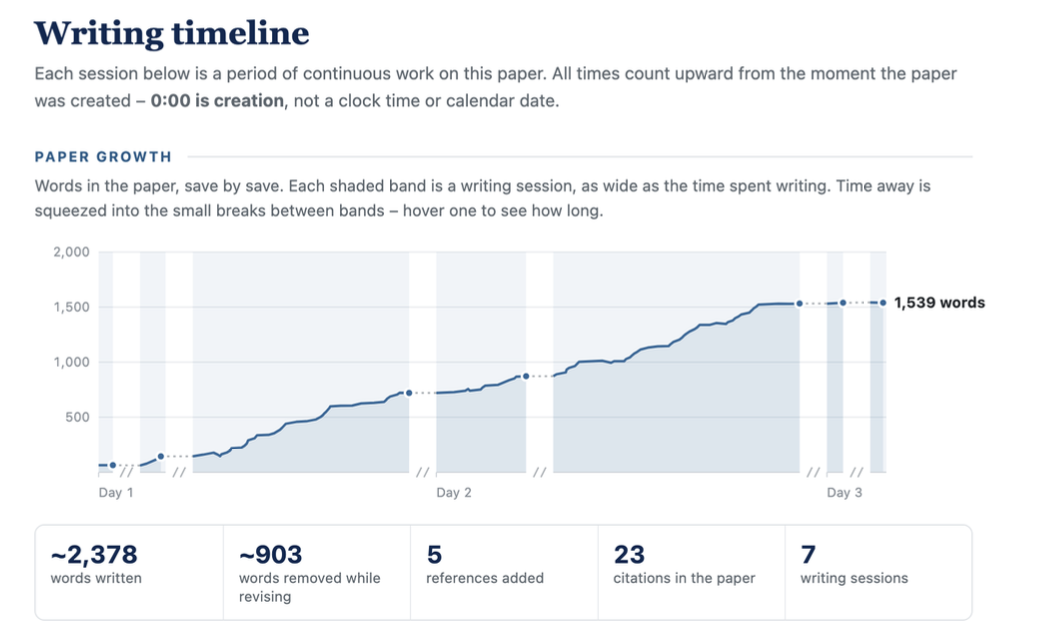
Seven sessions over three days. The paper grows steadily, text gets cut while revising, and sources get cited along the way. By the end: approximately 2,378 words written, 903 removed while revising, five references added, and 23 citations across the paper. The sources over time chart shows citations accumulating gradually as the writing progressed.
Pasted in all at once
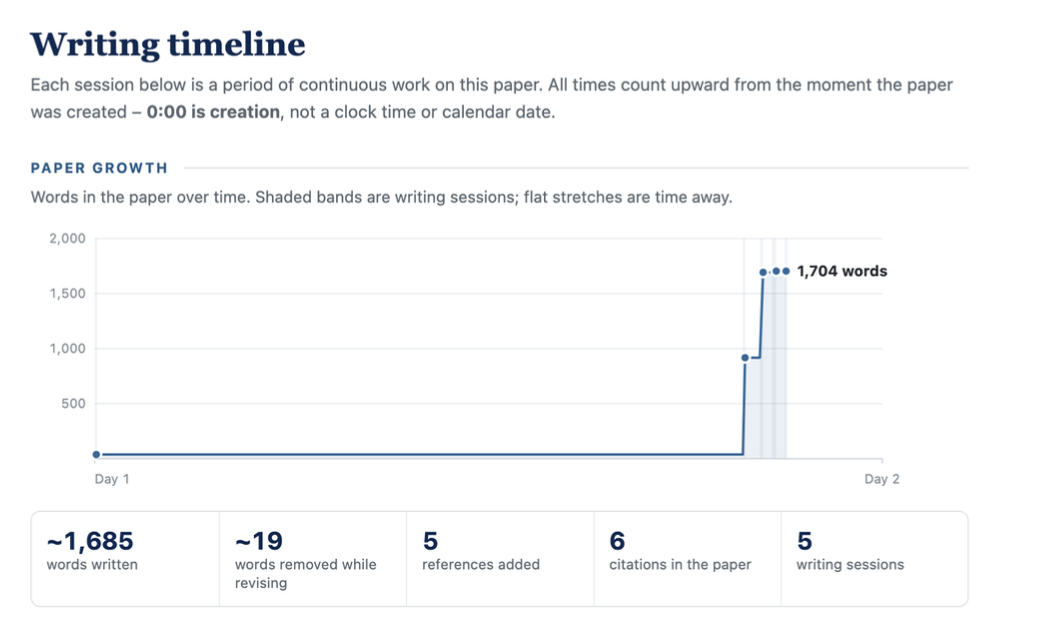
Five sessions, 23 minutes of active writing time. Two large blocks of text appeared minutes apart. Almost nothing was revised. All five references and all six citations were added in the final session.
A student who drafts somewhere else and pastes into PERRLA to format can look a lot like the second sample. That’s exactly why the timeline doesn’t label anything. It gives you something concrete to ask about.
How faculty access the Writing Timeline
When your institution enables the Writing Timeline, every research paper written in PERRLA includes a link on its title page. Faculty click the link, sign in to PERRLA, and the record opens. Only the student and faculty at your institution can access it – the timeline is never public.
Faculty can download the timeline as a PDF or print it directly from the record. The download button is available alongside the paper’s Word and PDF export options on the student’s side as well, so students can share their own record if they choose.
Program-level oversight with the Organizational Admin dashboard
For program coordinators and administrators, PERRLA’s Organizational Admin dashboard gives a broader view.
Administrators at institutions with a PERRLA site license can see writing activity across their program: which students are using PERRLA, how papers are being written, and where the Writing Timeline has been accessed. It’s the kind of oversight that helps program leaders spot patterns, support struggling students early, and document outcomes for accreditation and institutional review.
What it costs and how to turn it on
The Writing Timeline is included in your institution’s PERRLA license. There’s nothing extra to purchase or configure on your end. It’s off by default – your school activates it, and we’ll walk you through it first so students hear about the feature from you before they encounter it in their papers.
The Writing Timeline works with research papers written in PERRLA Online and the PERRLA Word Add-In. Google Docs support is not yet available.
For students: Your timeline is yours, too
The Writing Timeline isn’t just for faculty. Students can download or print their own record at any time – before they submit, or afterward if questions arise about their work. If you’ve written your paper in PERRLA, your timeline is a record of everything that happened: every session, every source added, every citation placed.
In a world where AI detection tools produce false positives – and research shows they do so at disproportionate rates for some student populations – a documented writing process is a form of protection that no detector can provide.
Want to see how it works for your program?
If you’re a faculty member, program coordinator, or administrator interested in how the Writing Timeline works within a PERRLA institutional license, we’d love to walk you through it. Reach out to PERRLA CEO Graysen Pack directly at graysen@perrla.com or visit perrla.com/partners to learn more about institutional licensing.