.png)
You've finished your paper, run it through Grammarly, and everything looks clean. The grammar is fixed. The spelling mistakes are gone. The sentences read smoothly.
So you're done, right?
Not necessarily.
A paper can read beautifully and still lose points for citation or formatting mistakes. That's where the difference between Grammarly and PERRLA starts to matter.
The two tools solve different problems. Grammarly focuses on how your writing reads. PERRLA focuses on helping you meet APA, MLA, and Turabian formatting and citation requirements.
Here's the short answer, then the full breakdown.
Grammarly is a writing assistant. Its core job is the quality of your sentences - grammar, spelling, clarity, tone, and word choice. It's good at that.
Grammarly does offer citation-related features, including tools that can help users create citations. However, Grammarly's primary focus is writing assistance, not formatting entire papers to APA, MLA, or Turabian requirements.
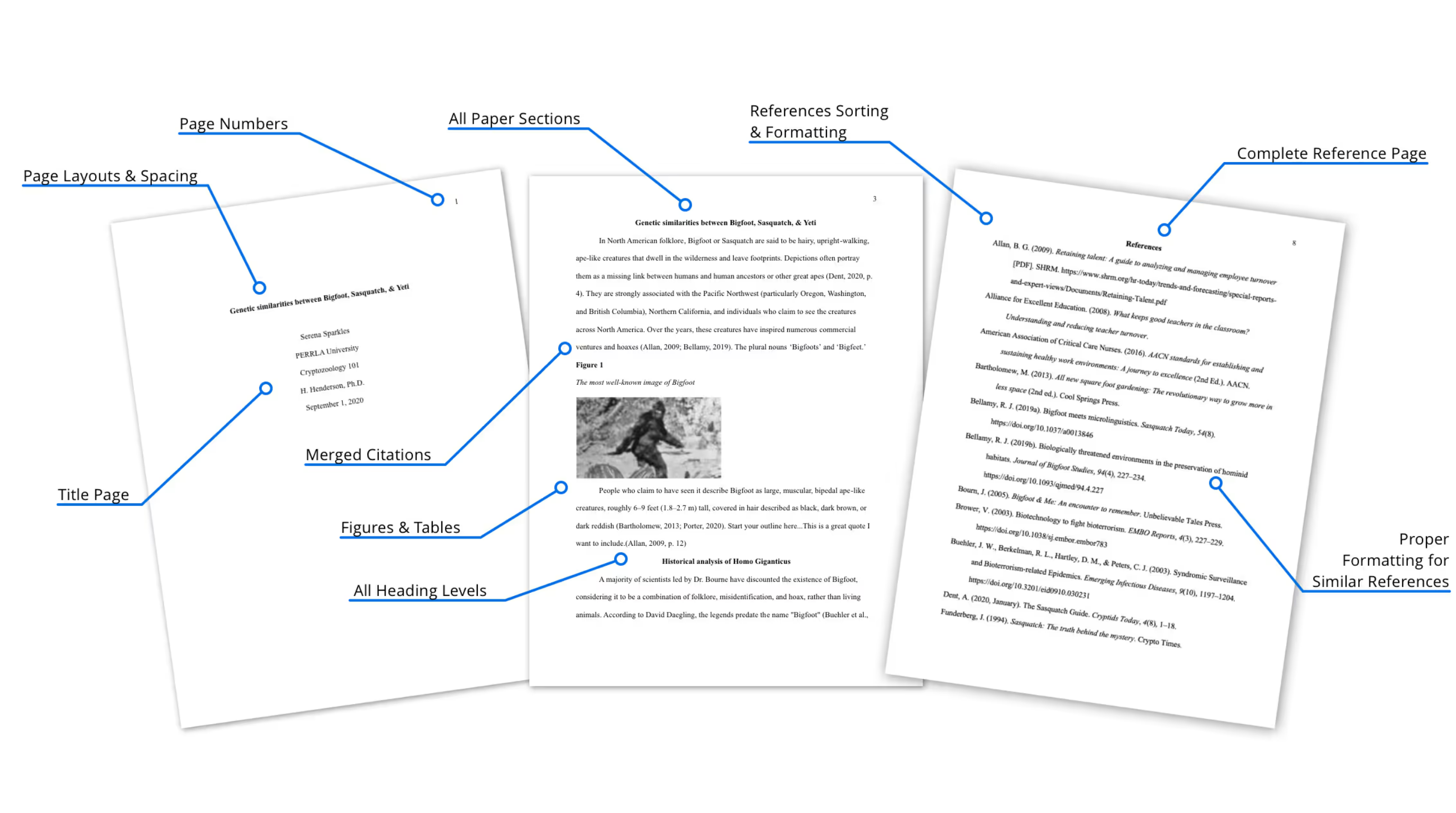
PERRLA is built around the paper itself, including the citations and formatting requirements that fall outside Grammarly's primary focus.
• Building accurate references in APA, MLA, and Turabian
• Formatting the whole document to the style guide (title page, headings, spacing, reference list)
• Keeping in-text citations and the reference list in sync as you write
PERRLA's citation engine is built from the APA 7 manual and verified against it.
This is where students often run into trouble: a paper can read perfectly clean and still lose points because the formatting and references don't match what the style guide requires. Polished sentences and correctly formatted APA are two different jobs.
A simple way to think about it is this: Grammarly focuses on the writing itself. PERRLA focuses on the formatting and citations around that writing..
No. Many students use Grammarly and PERRLA together. Grammarly helps improve grammar, spelling, clarity, and readability.
PERRLA helps ensure citations and formatting follow APA, MLA, or Turabian requirements. Because they're solving different problems, many students find they work well side by side.
No. PERRLA formats what you've already written. It doesn't rewrite sentences, adjust tone, or alter your voice. That's intentional.
Grammarly is designed to help improve how your writing reads. PERRLA is designed to help ensure the formatting and citations are correct while keeping the student's writing unchanged.
PERRLA also makes only standard spelling suggestions, deliberately, so it doesn't alter a student's voice. A tool built to rewrite and reword sentences changes how the writing sounds. PERRLA leaves the student's words alone. For students and faculty, that's an important distinction.
We're not going to pretend PERRLA is better at everything, because it isn't.
Grammarly does several things better than PERRLA:
• Grammar correction
• Clarity suggestions
• Tone feedback
• Sentence-level editing
• General writing assistance
If your biggest concern is improving how your writing reads, Grammarly is built for that.
The one disclosed place PERRLA uses an LLM is to pull bibliographic details such as author, title, and publication date from a PDF. Those details are then verified against third-party databases such as CrossRef and ISBNdb.
As AI tools become more common in academic writing, it's worth understanding the difference between generating citations and formatting them. Asking a chatbot to generate citations can sometimes produce references that look correct but contain inaccurate or fabricated information.
Grammarly and other AI-powered writing tools can also suggest reworded sentences, revised phrasing, and tone adjustments. For some students and instructors, that raises questions about how much of the final wording comes from the student versus the software.
PERRLA serves a different role. Its citation engine is built from the APA 7 manual, and it never generates or alters the content of your paper.
Both tools give students a way to show how a paper was written. They go about it differently.
Grammarly Authorship records your writing as it happens. It labels text as typed, pasted, or AI-generated, names the sources pasted text came from, and can replay how the document was written. Students choose whether to share the report.
PERRLA's Writing Timeline is built from the saves PERRLA already makes. It shows your writing sessions, how long you worked, how the paper grew, and the sources you added. It never includes the paper's text, never labels anything as AI or human, and never shows dates or times of day. At schools that use it, a link on the title page lets faculty open the timeline, and the student can take that link off.
Grammarly Authorship works in more places, including Google Docs. The Writing Timeline covers writing done in PERRLA Online and the PERRLA add-in for Word.
Does Grammarly create citations?
Grammarly offers citation-related features, including tools that can help users create citations. However, Grammarly's primary focus is writing assistance, including grammar, clarity, tone, and readability, rather than formatting entire academic papers.
Can Grammarly format my whole paper in APA?
Grammarly offers writing assistance and citation-related features, but PERRLA is specifically designed to help students format entire papers in APA, MLA, and Turabian styles, including document structure, citations, and references.
Should I use both?
Many students do. Grammarly helps improve grammar, clarity, and readability. PERRLA helps ensure citations and formatting follow APA, MLA, or Turabian requirements. Because they're solving different problems, many students use both together.
Does PERRLA use AI to generate citations?
PERRLA's reference engine is built from the APA 7 manual, and PERRLA never generates or alters your paper's content. The one disclosed use of an LLM is identifying bibliographic details from a PDF, which are then verified against databases like CrossRef and ISBNdb.
Is PERRLA's Writing Timeline the same as Grammarly Authorship?
No. Grammarly Authorship records typing and labels text as typed, pasted, or AI-generated. PERRLA's Writing Timeline summarizes your writing sessions, time worked, and how your paper grew, from the saves PERRLA already makes. It never labels writing as AI or human.
✔️ Great for testing how PERRLA works for you
✔️ Access to all PERRLA features & software
✔️ No credit card required!
✔️ For 1 year – or $12.95 a month, or $129.95 for 2 years
✔️ Access to all PERRLA features & software
✔️ 2 GB of storage, with files up to 10 MB
.avif)
.avif)