

If you’ve used PERRLA’s Chrome Extension before, you know it as a handy tool for creating references while you browse. The new version is something bigger. It’s a full research panel that lives inside Chrome, and it just made the process of finding, saving, and accessing your sources faster than ever.
Here’s what’s new.
The ‘Add to PERRLA’ button
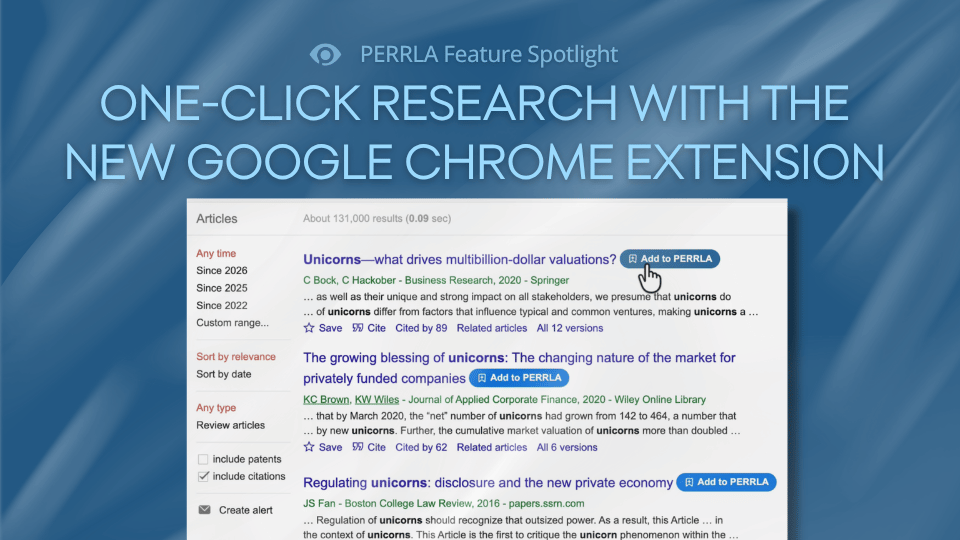
The biggest new addition is the Add to PERRLA button, a small blue button that now appears directly on the research sites and databases you’re already using. It’s built into the top 100 most popular research databases and websites based on real PERRLA user data, including:
- Google Scholar
- PubMed
- ScienceDirect
- JSTOR
- Everyday sources like the CDC and Mayo Clinic
With Google Scholar and similar databases, the button appears next to each search result. On individual web pages, it appears just below the page title.
Here’s how it works: when you find a source you want to cite, click the Add to PERRLA button. The PERRLA side panel opens, looks up the source automatically, and fills out the reference form for you – authors, title, journal, dates, and all. Review it, click Create, and the reference is in your PERRLA Reference Library for use in your papers. No copying and pasting, no hunting for author names, no manual data entry.
One smart detail: if a source is already in your PERRLA Reference Library, the button turns green and reads “Open in PERRLA” instead. That way, you’ll never accidentally add the same reference twice.
Automatic source saving
When you create a reference using the Add to PERRLA button, PERRLA doesn’t just save the citation. It will also save the source itself.
- If you’re viewing a PDF, or PERRLA can locate the article’s PDF on the page, it attaches the original file to your reference automatically.
- If no PDF is available, as might be the case with a regular webpage, PERRLA captures a clean snapshot of the page instead.
Either way, the source is saved alongside the reference in your PERRLA library. Weeks later, when you’re actually writing your paper, the article is right there, even if the website has changed, the link has broken, or your database access has expired. You can read it, highlight it, and pull passages directly into your PERRLA Research Notes without ever leaving PERRLA.
The Papers panel
PERRLA’s Google Chrome Extension also has a new Papers panel that lists every paper in your PERRLA account. From there, you can download the latest version of any paper as a Word document or a PDF.
Writing lab? Friend’s laptop? Last-minute edits before class? Your paper is always one click away.
How to get started
If you already have the PERRLA Chrome Extension installed, the new features are available now – just open the extension and sign in to your PERRLA account. If you haven’t installed it yet, you can get it from the Chrome Web Store. Visit our Help Center for step-by-step installation instructions.
Every PERRLA subscription includes access to the Chrome Extension, including our free trial. You can try PERRLA free for 7 days – no credit card required.