{ "@context": "https://schema.org", "@type": "Article", "headline": "Your Complete Guide: How the PERRLA Word Add-in Handles APA Formatting in Microsoft Word", "description": "Tired of fighting Word's citation tools? The PERRLA Word Add-in automates APA formatting – citations, reference lists, and paper templates – right inside Microsoft Word. Here's how it works.", "url": "/articles/perrla-word-add-in-handles-apa", "inLanguage": "en", "keywords": "PERRLA, APA formatting, Microsoft Word add-in, citation management, reference list, academic writing, citation generator, APA style", "image": { "@type": "ImageObject", "url": "https://cdn.prod.website-files.com/5c4895b961e54935bc78089d/69b96612a0395237c8382bfa_PERRLA%20vs%20Word.avif", "caption": "PERRLA vs Word" }, "author": { "@type": "Organization", "name": "PERRLA", "url": "https://www.perrla.com", "logo": { "@type": "ImageObject", "url": "https://cdn.prod.website-files.com/5c4895b961e54935bc78089d/68f63baa2e6c372ed251f823_Logo%20and%20Name%202.avif" } }, "publisher": { "@type": "Organization", "name": "PERRLA", "url": "https://www.perrla.com", "logo": { "@type": "ImageObject", "url": "https://cdn.prod.website-files.com/5c4895b961e54935bc78089d/68f63baa2e6c372ed251f823_Logo%20and%20Name%202.avif" } }, "mainEntityOfPage": { "@type": "WebPage", "@id": "/articles/perrla-word-add-in-handles-apa" }, "about": { "@type": "SoftwareApplication", "name": "PERRLA Word Add-in", "applicationCategory": "ProductivityApplication", "operatingSystem": "Microsoft Word", "description": "PERRLA Word Add-in automates APA formatting including citations, reference lists, and paper templates directly inside Microsoft Word.", "featureList": [ "Automatic citation generation", "Real-time formatting", "APA paper templates", "Reference list generation", "Word-integrated workflow" ], "offers": [ { "@type": "Offer", "name": "7-Day Free Trial", "price": "0", "priceCurrency": "USD", "url": "https://app.perrla.com/Public/#/free-trial-start" }, { "@type": "Offer", "name": "Monthly Subscription", "price": "9.95", "priceCurrency": "USD", "url": "https://app.perrla.com/Public/#/cart-step-1" }, { "@type": "Offer", "name": "1 Year Subscription", "price": "59.95", "priceCurrency": "USD", "url": "https://app.perrla.com/Public/#/cart-step-1" }, { "@type": "Offer", "name": "2 Years Subscription", "price": "77.95", "priceCurrency": "USD", "url": "https://app.perrla.com/Public/#/cart-step-1" } ] }, "mentions": [ { "@type": "SoftwareApplication", "name": "Microsoft Word", "applicationCategory": "WordProcessingApplication", "operatingSystem": "Windows, Mac" } ], "video": { "@type": "VideoObject", "name": "How PERRLA Integrates with Microsoft Word", "thumbnailUrl": "https://i.vimeocdn.com/video/2044110841-e61b3f2f22c1b3723a741ac67b2c35b50aa183705f87be1191bd46ed1411140f-d_1280?region=us", "embedUrl": "https://player.vimeo.com/video/1107171097", "uploadDate": "2025-01-01" }, "citation": [ { "@type": "ScholarlyArticle", "name": "Citation tools in academic libraries: Best practices for reference and instruction", "author": { "@type": "Person", "name": "Dawn Childress" }, "datePublished": "2011", "url": "https://doi.org/10.5860/rusq.51n2.143", "isPartOf": { "@type": "Periodical", "name": "Reference & User Services Quarterly", "volumeNumber": "51", "issueNumber": "2" }, "pageStart": "143", "pageEnd": "145" }, { "@type": "ScholarlyArticle", "name": "Cite it right: Critical assessment of open source web-based citation generators", "author": { "@type": "Person", "name": "Hui-Fen Chang" }, "datePublished": "2013", "url": "https://commons.emich.edu/cgi/viewcontent.cgi?referer=&httpsredir=1&article=1009&context=loexconf2011", "isPartOf": { "@type": "Book", "name": "LOEX Conference Proceedings 2011" } }, { "@type": "ScholarlyArticle", "name": "Free online citation generators: Which should undergraduates use with confidence?", "author": { "@type": "Person", "name": "Ho Chui Chui" }, "datePublished": "2022", "url": "https://ir.uitm.edu.my/id/eprint/65509/", "isPartOf": { "@type": "Periodical", "name": "Voice of Academia", "volumeNumber": "18", "issueNumber": "2" }, "pageStart": "70", "pageEnd": "92" } ] }


If you've ever tried to format an APA paper entirely in Microsoft Word, you know the drill: margin checks, hanging indents, citation formatting, and the quiet dread of wondering if you missed something. The PERRLA Word Add-in exists to take most of that off your plate. This guide walks through what it does, how to get it set up, and why it's worth using over cobbling together a workflow from Word's native tools and whatever free citation generator came up in your last Google search.
But first – a quick note on what citation management software actually is, and why it matters.
What is citation and reference management software?
Citation management tools – sometimes called bibliographic or reference managers – help researchers collect, organize, and format sources for academic writing, saving time and reducing formatting mistakes (Childress, 2011).
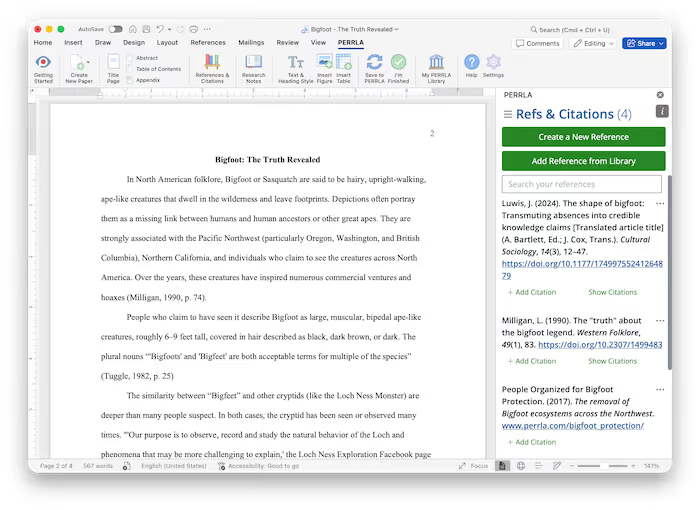
PERRLA installs directly into Microsoft Word and takes over the parts of APA formatting that eat up your time: citation generation, reference list building, and paper templates. You focus on writing. PERRLA handles the formatting.
That's a meaningful distinction from the broader landscape of citation tools. Libraries often license full-scale managers like RefWorks and EndNote, while students gravitate toward free web generators like EasyBib, BibMe, and Citation Machine. Those tools can be convenient, but convenient and accurate aren't always the same thing.
A note on free citation generators.
Research has consistently shown that free web-based citation generators vary widely in accuracy across styles like MLA, APA, and Chicago (Chang, 2013).
PERRLA isn't a one-off generator you copy and paste from. It lives inside your document and manages your citations as part of the writing process – which is a fundamentally different (and more reliable) approach.
Once the add-in is installed, PERRLA appears as a ribbon-tab inside Word. From there you can create APA papers from our default templates, insert citations, and generate a reference list without ever leaving your document. No switching apps, no copy-paste errors, no formatting drift. Everything stays consistent because everything stays in one place.
A few things that make PERRLA worth using:
Once PERRLA is set up, it becomes part of your normal writing flow.
Use the "References & Citations" panel to build a complete, APA-formatted bibliography from scratch. You can search for a reference's bibliographic information with a DOI, ISBN, URL, or the author/title. PERRLA can create every single type of APA reference possible (really). And best of all, PERRLA handles the formatting – hanging indents, spacing, alphabetization – and gives you the ability to fine-tune the output if your instructor has specific requirements.
After you've created your reference, use the "Create Citation" button in the PERRLA panel to cite your reference with ease. You can customize your citation to fit your exact needs. PERRLA formats the in-text citation and keeps it updated as you continue to write. Need to change something? Edit the source in PERRLA and the update applies everywhere in your paper.
The honest answer: because free generators make mistakes that students often can't catch.
Research evaluating free online citation generators found that the most common problems were errors in capitalization, punctuation, and indentation – and that students unfamiliar with the required style were often unable to detect those errors on their own (Ho, 2022).
PERRLA is different because it manages citations inside your document – not just as text you paste into your paper (and hope for the best). The formatting is applied by a rules-based engine built specifically around APA guidelines, and everything stays synchronized as you write.
Less time fixing citations means more time writing. It's that straightforward. PERRLA handles the formatting mechanics so you can focus on your argument, your evidence, and your ideas.
The PERRLA Word Add-in doesn't just make citations easier – it makes them reliable. With our human-built, human-tested reference engine, live formatting, and a workflow that fits inside Microsoft Word, PERRLA takes the guesswork out of APA formatting so you can spend your time on the work that actually matters.
Give it a try and see how much easier your next paper is to put together!
Chang, H.-F. (2013). Cite it right: Critical assessment of open source web-based citation generators. LOEX Conference Proceedings 2011. https://commons.emich.edu/cgi/viewcontent.cgi?referer=&httpsredir=1&article=1009&context=loexconf2011
Childress, D. (2011). Citation tools in academic libraries: Best practices for reference and instruction. Reference & User Services Quarterly, 51(2), 143–145. https://doi.org/10.5860/rusq.51n2.143
Ho, C. C. (2022). Free online citation generators: Which should undergraduates use with confidence? Voice of Academia, 18(2), 70–92. https://ir.uitm.edu.my/id/eprint/65509/
✔️ Great for testing how PERRLA works for you
✔️ Access to all PERRLA features & software
✔️ No credit card requried!
✔️ Access to all PERRLA features & software
✔️ Great for exploring PERRLA's functionality
✔️ Our most affordable option
.avif)
.avif)