
PERRLA/Product/Discussion posts
Every discussion post, cited and ready to paste.
Discussion posts are half of the papers students write in PERRLA. Each one needs in-text citations and a reference list like any paper, just no title page. Start a Discussion Post, cite as you write, and paste the finished post into your course discussion board.
In APA, MLA, and Turabian. Discussion posts work in PERRLA Online, Microsoft Word, and Google Docs, with one library behind all three.
Week 2: Testing the Bigfoot Evidence
This week’s reading changed how I think about the hair samples that turn up in Bigfoot stories. When researchers ran DNA tests on 30 hairs credited to Bigfoot, the yeti, and similar creatures, every hair attributed to Bigfoot matched a known animal, from black bears to cows. The authors were careful about what that proves: the survey “cannot refute the existence of anomalous primates, neither has it found any evidence in support” (Sykes et al., 2014, p. 3). Only one of the Bigfoot hairs came back human (Sykes et al., 2014).
To me, that is the fair way to read the evidence. A hair that turns out to belong to a bear does not prove there is no Bigfoot, but it does mean the proof has to come from somewhere else. I would be curious what kind of evidence would change your mind, one way or the other.
References
Sykes, B. C., Mullis, R. A., Hagenmuller, C., Melton, T. W., & Sartori, M. (2014). Genetic analysis of hair samples attributed to yeti, bigfoot and other anomalous primates. Proceedings of the Royal Society B: Biological Sciences, 281(1789), Article 20140161. https://doi.org/10.1098/rspb.2014.0161
Copy paper to clipboard
A sample Week 2 post for an anthropology course, formatted in APA 7 the way PERRLA does it. The article is real; the post is made up.
From the prompt to the discussion board.
The same four steps in APA, MLA, and Turabian.
-
APA 7MLA 9Turabian 9 Research Paper Discussion Post Reference List Annotated Bibliography
First:
start a Discussion PostCreate a paper, pick APA, MLA, or Turabian, and choose Discussion Post. There's no title page to fill in, so the page opens ready for your first sentence.
-
DOI, ISBN, or link 10.1098/rspb.2014.0161Look up Sykes, B. C., Mullis, R. A., Hagenmuller, C., Melton, T. W., & Sartori, M. (2014). Genetic analysis of hair samples attributed to yeti, bigfoot and other anomalous primates. Proceedings of the Royal Society B: Biological Sciences, 281(1789), Article 20140161.
Before you write:
add your sourcesPaste the DOI, ISBN, or link for the week's reading and PERRLA fills the reference from the published record. Anything you saved for an earlier post is already in your library.
-
…“neither has it found any evidence in support” (
Mid-sentence:
cite as you writeType an opening parenthesis in APA or MLA, or a # in Turabian, and pick the source. Add a page number for a quote. The references build underneath, alphabetized, from what you cited.
-
Copy paper to clipboardReply …neither has it found any evidence in support” (Sykes et al., 2014, p. 3). References Post reply
Before you submit:
copy it into the boardIn PERRLA Online, click Copy paper to clipboard, then paste the post into your course discussion board. The citations and references come with it.
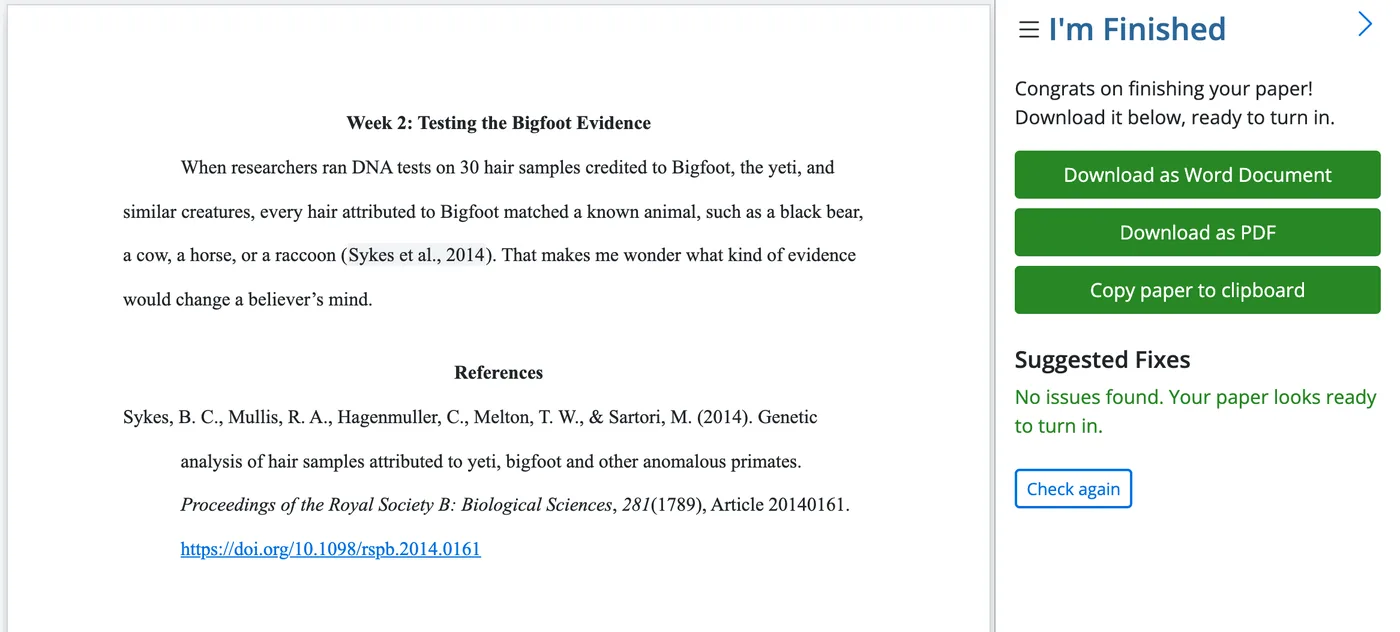
When it's done: copy it, paste it in.
Copy paper to clipboard picks up the whole post, citations and references included, so there's nothing to retype in the reply box.
- Your words, with each citation where you put it
- The references underneath, alphabetized, from the sources you cited
- No title page, because a discussion post doesn't need one
Copy paper to clipboard is in PERRLA Online, for discussion posts, reference lists, and annotated bibliographies. Canvas, Blackboard, Brightspace, and Moodle keep the post as close to APA as they allow; they drop the hanging indents and the double-spacing.
Two things PERRLA does with every post.
One saves you the reference this week. The other saves the whole post for later in the term.
10.1098/rspb.2014.0161
Sykes, B. C., Mullis, R. A., Hagenmuller, C., Melton, T. W., & Sartori, M. (2014). Genetic analysis of hair samples attributed to yeti, bigfoot and other anomalous primates. Proceedings of the Royal Society B: Biological Sciences, 281(1789), Article 20140161. https://doi.org/10.1098/rspb.2014.0161
Paste a DOI, an ISBN, or a link and PERRLA fills the reference from the published record. It's saved in your library for every post after this one.
Week 2 · Discussion Post: Bigfoot evidence
Week 9 · Research Paper: Bigfoot evidence
Convert a discussion post to a Research Paper and the writing, the references, and the citations come with it.
Converting a post to a research paper is in PERRLA Online.
Every week, in any format, wherever you write.
A discussion post is often due every week. The steps stay the same, and your library grows with every post.
APA, MLA, and Turabian
Discussion Post is a paper type in all three formats: APA 7, MLA 9, and Turabian 9. Pick the one your course uses.
PERRLA Online, Word, or Google Docs
Start the post wherever you write. One account and one library, so a source you cited in Word last week is ready in PERRLA Online tonight.
At a school with the Writing Timeline
On posts written in PERRLA Online or Word, a View Writing Timeline link sits as the last line of your references. You can take the link off any time, and taking it off deletes nothing. About the Writing Timeline
Questions about discussion posts
Do discussion posts need APA citations?
How do I get my post into the discussion board?
Can I write discussion posts in Word or Google Docs?
Can I reuse sources from last week's post?
Can a discussion post turn into a research paper?
Does PERRLA write any of my post?
Next week's post starts with this week's sources already in your library.
Try PERRLA free for 7 days