

An annotated bibliography is a reference list where each entry is followed by a short paragraph – the annotation – describing and evaluating the source. In APA format, annotations appear directly below the reference entry they belong to, and the whole page follows the same formatting rules as the rest of your paper.
In this post, we’ll cover what annotations include, how to format the page, and two ways to build one using PERRLA.
What is an annotated bibliography?
A standard APA reference page lists your sources. An annotated bibliography does the same thing and then adds a paragraph underneath each entry explaining what the source is, what it argues, and how it fits your research.
Assignments vary, but most annotations do one or more of the following:
- Summarize what the source covers and what its main argument or findings are
- Evaluate the source’s credibility, methodology, or limitations
- Reflect on how the source connects to your own research question or thesis
Your instructor’s assignment sheet will specify which combination they want. If it doesn’t, ask.
APA format for annotated bibliographies
An annotated bibliography in the APA format follows the same page setup as any other APA paper: one-inch margins, double spacing throughout, and one of APA 7’s approved fonts used consistently, such as 12-point Times New Roman, 11-point Arial, or 11-point Calibri. Follow your instructor’s requirements if they specify a font.
For a standalone, APA-style bibliography, follow your instructor’s directions for the title page and setup. If the assignment calls for the heading ‘Annotated Bibliography,’ center it and use bold title case. Each reference entry is formatted exactly as it would appear in a standard APA reference list.
The annotation appears directly below the reference entry it belongs to. Indent the entire annotation paragraph 0.5 inches from the left margin – do not indent its first line an additional 0.5 inches. If an annotation has multiple paragraphs, indent the first line of each subsequent paragraph an additional 0.5 inches. Annotations are typically one paragraph long, though some instructors allow two.
Here’s what a single entry looks like:
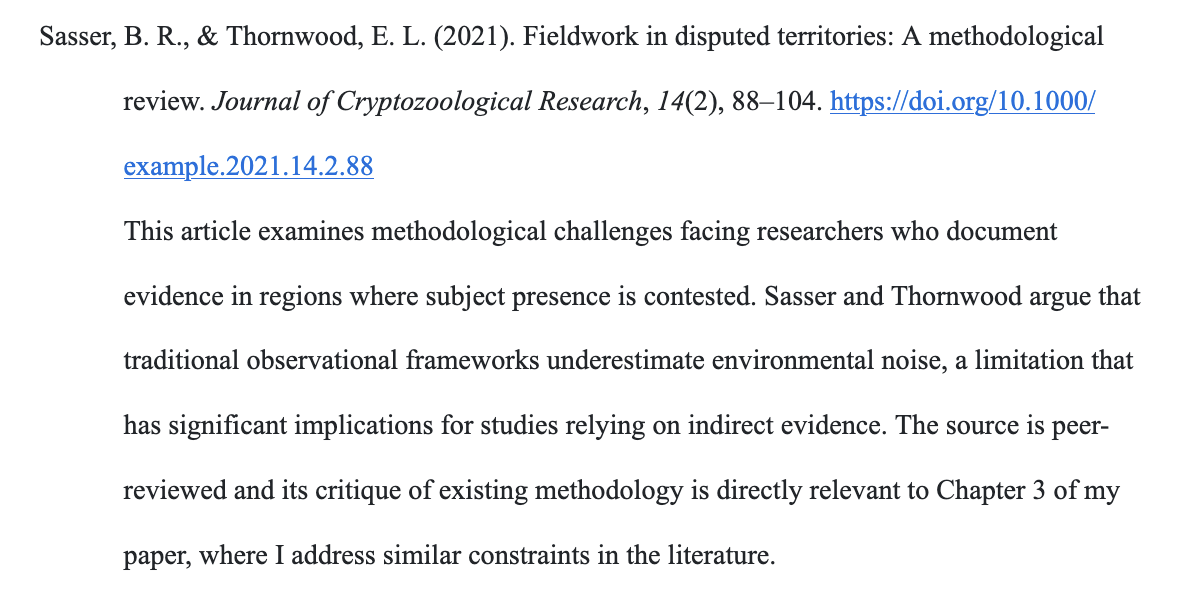
Notice that the reference entry itself uses a hanging indent (the second and subsequent lines are indented), and the annotation paragraph below it is indented as a separate block. The entire bibliography is double-spaced, including the space between entries. Do not add extra blank lines between entries unless your instructor specifies otherwise.
How long should annotations be?
Most APA annotations run 150 to 200 words per entry, though this varies by instructor. If an assignment calls for a certain number of words per annotation, that requirement overrides any general guideline. The annotation is a short, focused paragraph – not a full-page summary and not a single sentence.
Some instructors ask for descriptive annotations (summary only); others want evaluative annotations (summary plus your assessment); and others want reflective annotations (summary plus how the source fits your research). The format on the page is the same regardless; the difference is in what you write.
Building an annotated bibliography in PERRLA
PERRLA supports annotated bibliographies two different ways, depending on what your assignment looks like.
Option 1: The Annotated Bibliography paper type
If your assignment is only an annotated bibliography – just the reference page with annotations, no essay or analysis section – start a new paper and choose Annotated Bibliography as the paper type. As you add references, PERRLA will include space for you to write your annotations.
Option 2: Annotations inside a Research Paper
If your assignment includes both a paper and an annotated reference list, start a Research Paper in PERRLA. The annotation workflow for PERRLA Online and the PERRLA Add-In for Microsoft Word is as follows:
For PERRLA Online:
- Add the references your paper needs.
- Right-click the reference you want to annotate.Do this in the actual paper, not in the side panel.
- Choose Add Annotation.
For the PERRLA Add-In for Microsoft Word:
- Go to the PERRLA ribbon tab.
- Click References & Citations.
- Hover over the reference you'd like to annotate in the PERRLA side panel.You'll see the More options icon – three dots – appear on the right.
- Click the More options icon.
- Select Add Annotation.
In both cases, PERRLA will insert 'Type Your Annotation Here' beneath the reference. Replace it with your annotation text, and PERRLA will automatically ensure it's in the proper format.
What an annotated bibliography is not
Two things students sometimes confuse with annotated bibliographies:
- An abstract is a summary of your own paper that appears at the beginning of it. An annotation is a summary of a source, attached to that source’s reference entry.
- A literature review is an essay-style analysis of multiple sources that synthesizes them into a narrative argument. An annotated bibliography lists and describes sources individually. It does not weave them together.
Both abstracts and literature reviews involve summarizing information, which is probably where the confusion arises. But the page format and the purpose are different.
Write your annotated bibliography in PERRLA
PERRLA formats the reference entries and annotations automatically, so you can put your energy into writing strong annotations.
Try PERRLA free for 7 days, no credit card required.