

Every field has words a standard spellchecker has never heard of. Drug names, scientific terms, theorists’ names, words from other languages. For a long time, you could teach PERRLA a word – but only until you logged out or switched computers. Then the red squiggles came back.
PERRLA Online now has a custom spellcheck dictionary that’s saved to your account. Add a word once, and it’s recognized everywhere you use PERRLA Online, on every computer you sign in to.
What’s new
- Your dictionary follows your account, not your browser. Log out, switch computers, come back – your words are still there.
- A dictionary page in Settings. See every word you’ve added, search the list, and add, edit, or delete words. Large lists get an A–Z bar to jump to a letter.
- Import a whole word list at once. Drop in a .csv or .txt file, and PERRLA shows how many new words it found before adding anything. Import lists can be one word per line or separated by commas, and multi-word phrases get split into single words. Imports skip words you already have in your PERRLA dictionary.
- Capitals and possessives are covered automatically. Add “Zolpidem” and spellcheck also accepts “zolpidem,” “ZOLPIDEM,” “Zolpidem’s,” and “zolpidem-based.”
- Works offline. A word added without internet works right away and saves to your account when you’re back online.
- Undo a delete. A deleted word stays crossed out for a few seconds with an Undo button, so accidental deletions are easy to reverse.
How to add words
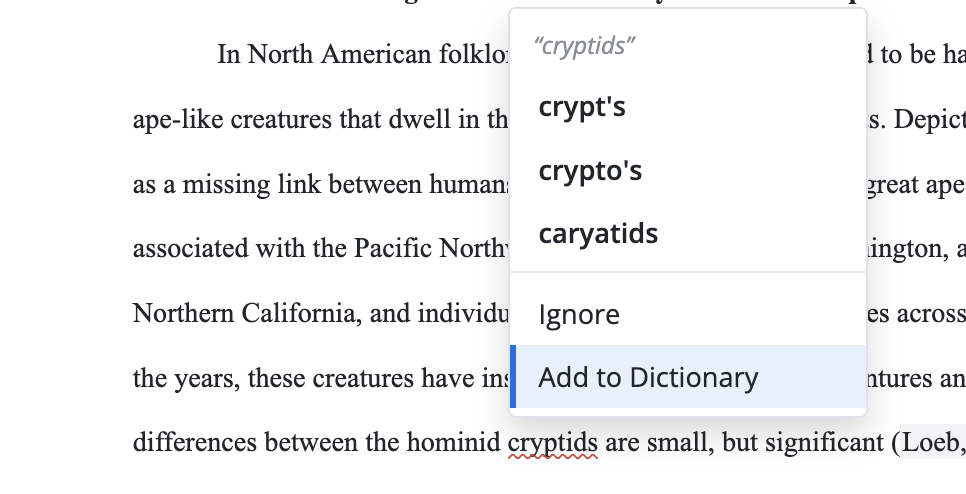
The fastest way is right from your paper. When a word gets a red underline:
- Right-click the underlined word.
- Choose Add to Dictionary.
That’s it. The word is saved to your account and won’t be flagged again.
Managing your dictionary
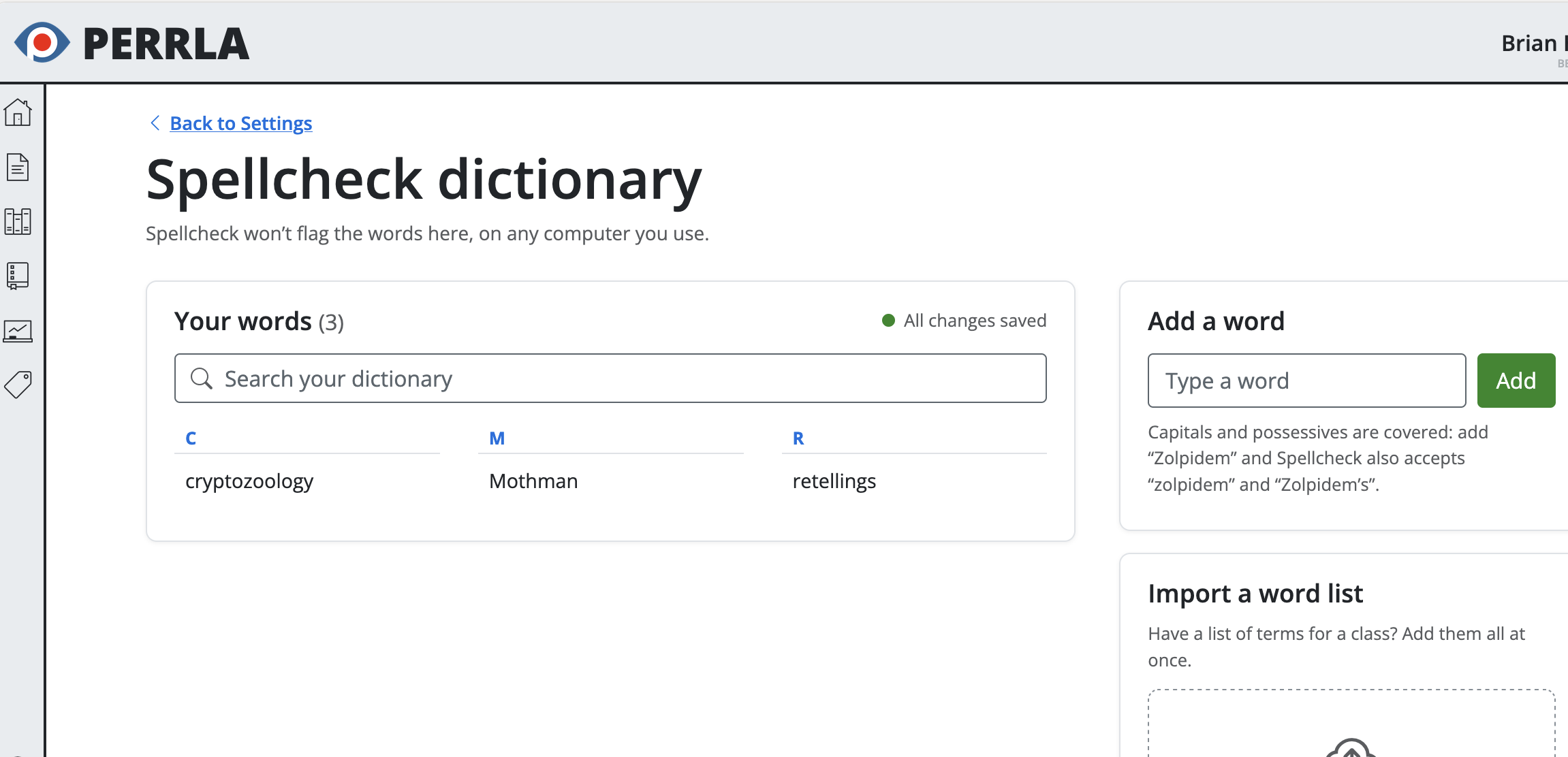
- Open Settings.
- Go to Preferences.
- Find Spellcheck dictionary and click Manage.
From here, you can add individual words, import a word list from a .csv or .txt file, search your dictionary, and edit or delete entries.
Tips for getting the most out of it
- Nursing and health sciences students: Add drug names and clinical terms the first time they’re flagged. You’ll never see them underlined again, on any computer.
- Got a vocabulary list from class? Save it as a .csv or .txt file and import the whole thing in one step.
- Add plurals separately if you use them. Adding “Zolpidem” covers capitals and possessives, but not “Zolpidems” – which means a real typo like an extra “s” will still get caught.
- Added a misspelling by accident? Edit or delete it from the dictionary page.
Your writing stays on your computer
PERRLA’s spellcheck runs right in your web browser. Your writing isn’t sent anywhere to be checked. Only your dictionary words are saved to your account. When you import a word list, PERRLA reads the file in the browser and saves only the words, not the file itself.
Three Colors. Three Jobs. One Less Thing to Miss.
PERRLA Online now uses three colors to flag three different kinds of issues:
- Red – spelling
- Blue – grammar
- Purple – format issues specific to your paper’s style (APA, MLA, or Turabian)
The purple squiggle is the new one. PERRLA Online now catches format mistakes as you type – not just when you click I’m Finished. Double spaces, punctuation around quotation marks, et al. punctuation, contractions, ampersands in prose, and numbers that should be words (or words that should be numbers) all get flagged in real time.
For example, In an APA 7 paper, type “The 5 nurses agreed.” The “5” gets a purple squiggle. Right-click it, and PERRLA explains the rule – “spell out numbers zero through nine” – with a one-click fix. Or choose Ignore.
PERRLA knows which style you’re writing in. The same sentence can be correct in one format and wrong in another. MLA 9 and Turabian 9 papers get checks APA 7 doesn’t have, and vice versa.
The purple squiggle works alongside Grammarly and QuillBot. If Grammarly or QuillBot are running, spellcheck is handed off to them; but those tools don’t know APA from MLA, so PERRLA’s format checks stay on even when they’re running. If you prefer, you can turn the real-time style checks off from the Edit menu – they’re on by default. The I’m Finished button still runs every check at the end regardless.
A note on availability
Both the custom dictionary and the purple squiggle are available now in PERRLA Online. PERRLA’s Microsoft Word Add-In and Google Docs integration use Word’s and Google’s own spellcheck, so the PERRLA custom dictionary doesn’t apply there. Papers written in APA 6 or MLA 8 use an older spellchecker and don’t get these features.
Try it now
Open PERRLA Online, right-click the next word that gets flagged, and add it to your dictionary. Every PERRLA subscription includes access to PERRLA Online.
Try PERRLA free for 7 days – no credit card required.