Feature Spotlight: The ‘I’m Finished’ Button Just Got Smarter
PERRLA’s I’m Finished button now checks your paper for common formatting and citation mistakes before you submit – citations after the period, missing page numbers, hand-typed citations, contractions, wrong title casing, and more. One-click fixes handle most issues. It’s a second pair of eyes, not a gate.
B
Brian @ PERRLA · Published September 10, 2026
PERRLA has always helped you build a properly formatted paper from the start. Now it checks your work before you submit. The updated I’m Finished button in PERRLA Online reviews your paper for common formatting and citations mistakes – and gives you one-click fixes for most of them.
It’s a second pair of eyes, not a gate. You can always download your paper anyway.
What PERRLA checks for
When you click I’m Finished, PERRLA scans your paper and flags issues like:
References that are never cited in the body of your paper
Double spaces or extra spaces around punctuation
Citations typed by hand instead of added through PERRLA
Reference titles in the wrong case for your paper’s format
These are among the most common formatting errors we see in student papers (the kind that are easy to miss after staring at the same document for hours).
How it works
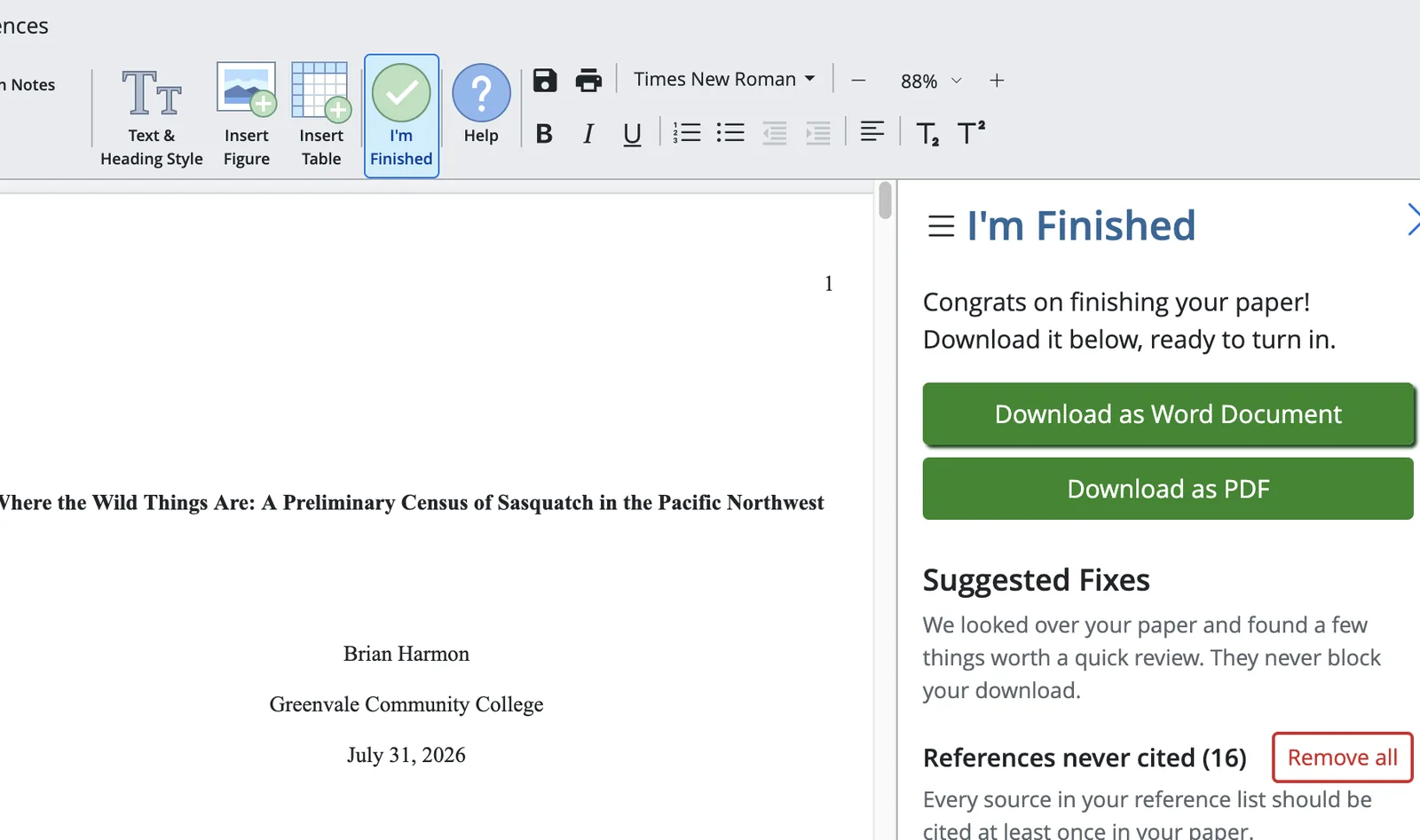
Click I’m Finished in the PERRLA Online toolbar. A panel opens on the right side of your paper with two sections:
Suggested Fixes
Any issues PERRLA finds appear here as a list of flagged items. Click the magnifying glass next to any item to jump directly to that spot in your paper. Fix it, then click Check again – anything you’ve resolved disappears from the list. Most findings have a one-click Fix option, and when the same issue appears multiple times, a Fix all option handles them all at once.
Download your paper
When you’re ready to turn it in, download your paper directly from the same panel as a Word document or as a PDF. That’s the file you submit.
A note on availability
Suggested Fixes is available now in PERRLA Online for papers created after July 28, 2026. If you have an older paper and don’t see the checks, create a new paper and paste your content in – or keep an eye out as we continue to expand the feature.
We’re also bringing these checks to the I’m Finished panel in the PERRLA Word Add-In and Google Docs. More on that soon!
AI writing detectors return verdicts. PERRLA’s Writing Timeline shows faculty how the paper was actually built – the writing sessions, when sources arrived, and how the paper grew over time – without scores, labels, or…
PERRLA Online now has a custom spellcheck dictionary saved to your account – add a word once and it follows you to every computer you sign in on. Plus: a new purple squiggle catches format mistakes in real time as you…
PERRLA now offers three storage plans for your research files. The base PERRLA plan includes 2 GB of file storage. PERRLA Pro adds 10 GB and Priority Support. PERRLA Unlimited gives you unlimited storage and the largest…
PERRLA formats the whole paper in APA 7, MLA 9, and Turabian 9, from the title page to the last reference.